

Adobe Acrobat Studio: Turn PDFs Into Presentations and Meeting Prep
Most businesses already have the information they need to make better decisions. The problem is that the information is usually scattered across PDFs, email attachments, reports, proposals, meeting notes, spreadsheets, and web links.
Adobe's recent Acrobat update is aimed directly at that problem. In its Adobe Blog article on Acrobat and Express, Adobe introduced new Acrobat Studio capabilities that can help users turn documents into presentations, edit PDFs through chat, generate podcast-style summaries, and collaborate inside PDF Spaces.
For small and mid-sized businesses in Trinidad and Tobago, the practical opportunity is not just "AI for AI's sake." It is faster preparation, cleaner client communication, and less time wasted rebuilding the same information into different formats.
Why This Matters for Everyday Business Work
A lot of office work starts with a document but does not end there.
A sales proposal may need to become a presentation. A long report may need to become a management summary. A set of supplier documents may need to be reviewed before a meeting. A project file may need comments from multiple people before a decision can be made.
Traditionally, that means copying, pasting, reformatting, chasing feedback, and recreating content manually. Acrobat Studio is designed to reduce that friction by connecting Acrobat's trusted PDF tools with Adobe Express and AI-assisted workflows.
That can be especially useful for teams that do not have a dedicated design department but still need professional-looking material.
Turning Documents Into Presentations
One of the most useful features is Generate presentation. Adobe describes a workflow where Acrobat can analyze files and links in a PDF Space, create an outline, then help generate a polished presentation using Adobe Express.
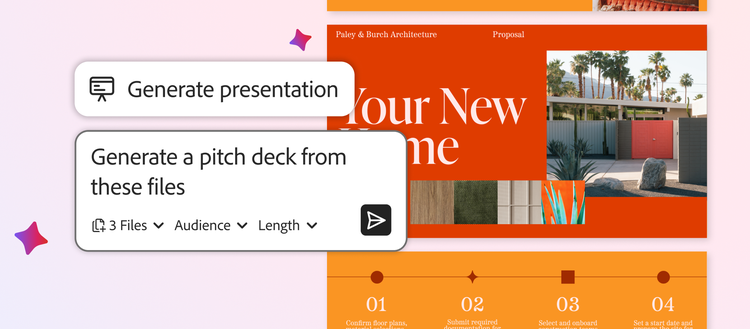
For a local business, that could mean turning product sheets, pricing notes, client requirements, and research into a first-draft pitch deck. It still needs human review, but it gives the team a better starting point than a blank slide.
Useful examples include:
- Sales teams preparing client proposals
- Managers summarizing reports for board or department meetings
- HR teams turning policy documents into staff briefings
- Operations teams explaining a new process or project
- Marketing teams creating campaign overviews from research notes
The value is speed and consistency. Staff can spend more time refining the message and less time fighting with formatting.
Chat-Based PDF Editing Can Save Time
Adobe also highlighted new chat-based Acrobat AI features for PDF tasks. Instead of hunting through menus, users can ask Acrobat to perform common actions such as removing pages, editing content, adding signatures, applying passwords, or getting step-by-step help.
This matters because PDF work is often urgent. A contract needs one page removed. A form needs protection before sending. A signed document needs to be prepared for a customer. If staff can complete those tasks safely and quickly, the business avoids delays.
There is still a governance point: businesses should decide which staff are allowed to edit, sign, protect, and distribute official documents. AI assistance improves speed, but document control still matters.
Podcast-Style Summaries for Meeting Prep
The Generate podcast feature is another practical idea. Adobe describes using Acrobat to turn notes, transcripts, attachments, and long reports into an audio-style summary that can help someone prepare for a meeting.
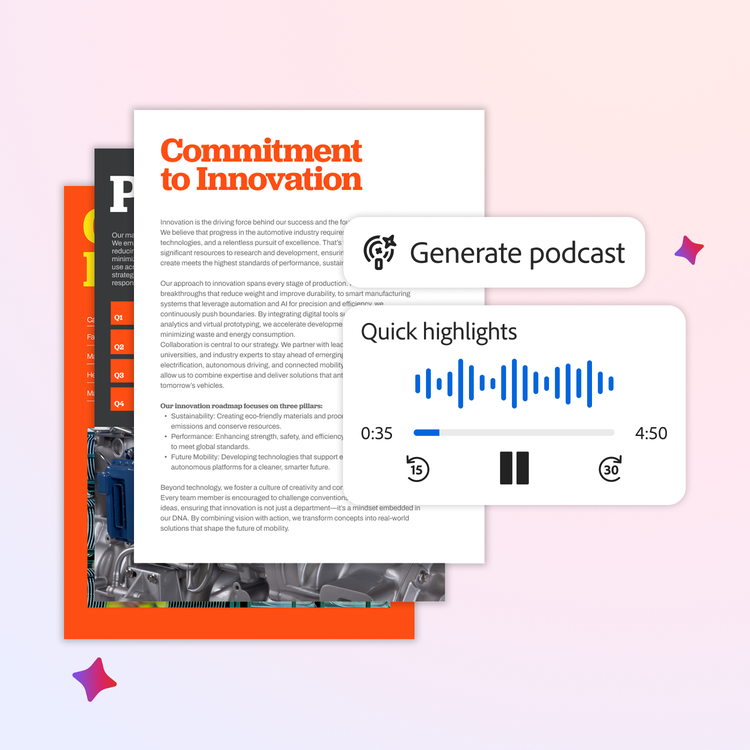
For busy owners, managers, and sales teams, that can be helpful when there is too much to read and too little time. A short audio summary of a proposal pack, project file, or meeting transcript can make preparation easier before a site visit, client call, or internal review.
Used properly, this does not replace reading the source material. It helps people get oriented faster so they know what to focus on.
PDF Spaces Can Reduce Version Confusion
PDF Spaces is also worth paying attention to. Adobe positions it as a place to bring together files and links, collaborate with others, add comments, and use AI Assistant to find insights.
That can reduce the common problem where every department has a different copy of the same document. When teams work from one shared space with clear comments and source material, decisions can move faster.
The key is implementation. Businesses should connect this with proper Microsoft 365, SharePoint, OneDrive, or file-server practices so documents are stored securely and staff know where the official version lives.
How Blue Chip Can Help
Blue Chip Technologies helps businesses select, license, deploy, and support productivity tools in a way that matches real office workflows.
For Adobe Acrobat, Adobe Express, and related document workflows, that can include:
- Choosing the right Adobe plan for the users who need it
- Setting up Acrobat and PDF workflows alongside Microsoft 365
- Standardizing PDF signing, protection, sharing, and storage practices
- Training staff on safe AI-assisted document use
- Helping teams move from manual document handling to repeatable workflows
- Supporting endpoint, identity, and backup controls around business documents
AI document tools are useful when they are connected to a clear process. Without that process, they can create more scattered files and more confusion. With the right setup, they can save real time and improve the quality of client-facing work.
If your team spends too much time converting reports into slides, summarizing long documents, or chasing feedback across email attachments, it may be time to review your PDF and document workflow.
Source: Adobe Blog — Turn your docs into presentations and podcasts with Adobe Acrobat and Express.


