

Adobe for Creativity in Claude: Faster Campaign Assets for Small Teams
Small businesses often need more marketing material than their team has time to produce. A promotion needs an Instagram story. A flyer needs a cleaner layout. A product photo needs light retouching. A short clip needs formatting for social media. The work is important, but the process can be slow when staff have to jump between tools, remember exact steps, and rebuild the same campaign in different formats.
Adobe's latest announcement points to a practical direction for that problem. In an Adobe Blog post, Adobe introduced the Adobe for creativity connector for Anthropic's Claude. The idea is simple: describe the creative outcome in chat, then use Adobe's connected creative tools to move the work forward across applications such as Photoshop, Illustrator, Firefly, Express, Premiere, Lightroom, InDesign, and Adobe Stock.
For Trinidad and Tobago businesses, this is less about replacing a designer and more about giving small teams a better starting point for everyday campaign work.
Why This Matters for SMB Marketing
Many local businesses do not have a full-time design department. Marketing may be handled by an owner, office administrator, sales rep, or one busy marketing officer. That person still has to produce material for WhatsApp, Instagram, email, flyers, proposals, events, and customer notices.
The Adobe connector is useful because it reduces the friction between the idea and the first usable draft. A team member can describe the campaign, ask for a layout, adjust colours or copy direction, and continue refining the result instead of starting from a blank canvas every time.
That can help with routine jobs such as:
- Promotional social posts and stories
- Event flyers and notices
- Product or service announcements
- Simple brand-consistent campaign assets
- Photo cleanup and background adjustments
- Short video formatting for online channels
- First-draft layouts for sales or HR communication
The business still needs human judgment. Brand tone, pricing, claims, legal wording, and final approval must stay under the company's control. But the production time can drop significantly.
A More Natural Way to Use Creative Tools
Adobe says the connector can access more than 50 pro-grade tools and help orchestrate multi-step creative workflows. In practice, that means a user may not need to know which exact tool should come first. They can explain the desired outcome, then let the workflow guide them through the steps.
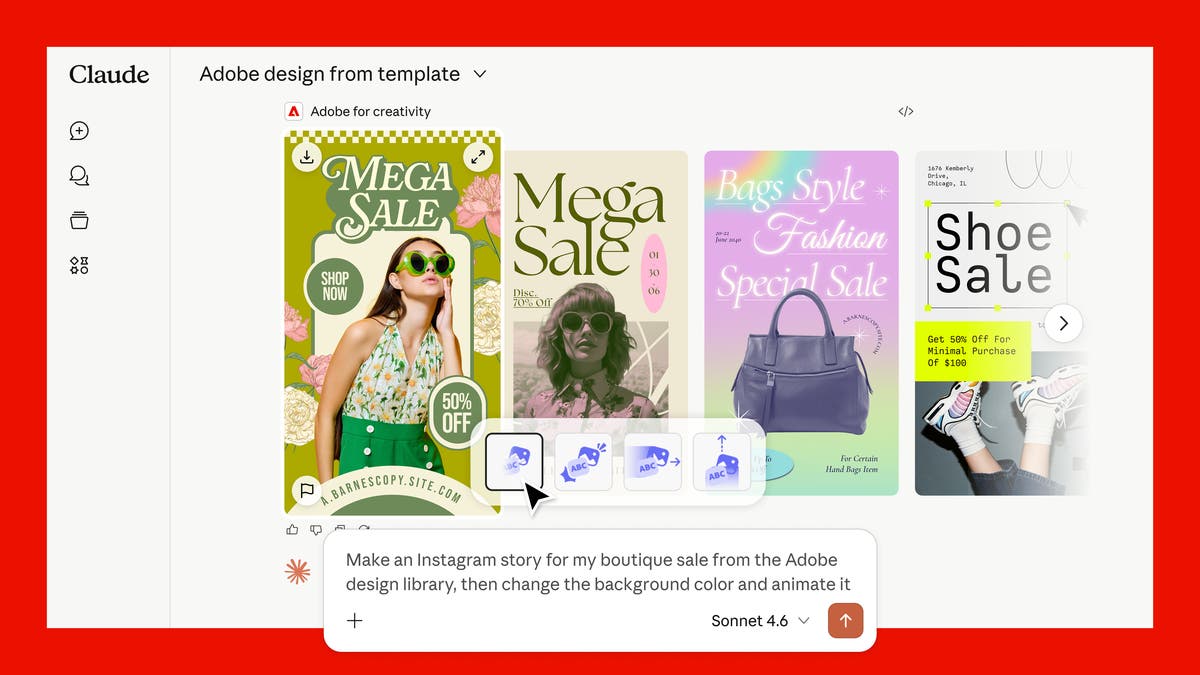
For example, a retail team could ask for a sale graphic based on existing brand colours, refine the background, adjust the product image, and create versions for multiple channels. A service company could create a campaign image, clean up a staff photo, and prepare a simple animated social asset without manually moving files through several disconnected steps.
This is where Adobe Express and Firefly become especially relevant for SMBs. They give non-specialist users a more approachable path to polished assets while still connecting back to Adobe's wider creative ecosystem when more advanced work is needed.
Licensing and Workflow Still Matter
AI-assisted creative tools are only helpful when the business sets them up properly. Without some structure, teams can end up with inconsistent branding, duplicated files, unclear ownership, and staff using personal accounts for company work.
Before rolling this out, businesses should think through:
- Which staff actually need Adobe access
- Whether users need Express, Acrobat, Creative Cloud, Stock, or a full creative plan
- Where campaign assets should be stored and backed up
- How brand templates, colours, fonts, and approved logos are managed
- Who approves customer-facing content before it is published
- How AI-generated content should be reviewed before use
- Whether staff need training on prompts, copyright-safe use, and brand consistency
This is the difference between a useful productivity tool and another uncontrolled app in the business.
How Blue Chip Can Help
Blue Chip Technologies helps businesses choose, deploy, license, and support productivity and creative tools in a way that matches real workflows.
For Adobe environments, that can include:
- Reviewing which Adobe products and plans fit the team
- Helping set up licensed user access correctly
- Connecting Adobe workflows with Microsoft 365, SharePoint, OneDrive, and endpoint management
- Creating practical file storage and approval processes for marketing assets
- Training staff on safe and effective AI-assisted creative workflows
- Supporting PCs, browsers, identity, backups, and security controls around business content
The goal is not to buy more software for its own sake. The goal is to help the team produce better material, faster, while keeping brand control and business data protected.
If your business regularly needs flyers, social posts, campaign graphics, proposal visuals, or simple video assets, this is a good time to review whether your creative workflow is helping or slowing the team down.
Source: Adobe Blog — Adobe for creativity: a new way to create with Adobe, now in Claude.


