

Adobe Video Workflows: Faster Content Without Losing Control
Video is no longer only for large marketing teams. A small business may need short clips for Instagram, training videos for staff, product explainers, event recaps, recruitment content, customer notices, or supplier presentations. The demand is there, but the workflow can quickly become messy: too many files, too many versions, noisy audio, inconsistent colour, and content stuck on one person's laptop.
Adobe's latest video-focused announcement is useful because it looks at the whole production chain, not just one editing feature. In an Adobe Blog post, Adobe highlighted new capabilities across Adobe Firefly, Premiere, After Effects, Adobe Stock, and Frame.io that are meant to help teams create, polish, and collaborate on video faster.
For Trinidad and Tobago SMBs, the practical question is simple: can your team produce more professional video content without creating another uncontrolled file-sharing problem?
What Adobe Announced
Adobe's update covers several areas that matter to business teams:
- Firefly Video Editor improvements for generating, editing, and finishing video in the browser
- Audio upgrades such as Enhance Speech and tools for cleaning up noise, reverb, speech, music, and ambience
- Adobe Stock access inside Firefly Video Editor for licensed images, video, audio, and sound effects
- New AI video model choices inside Firefly for different generation styles and production needs
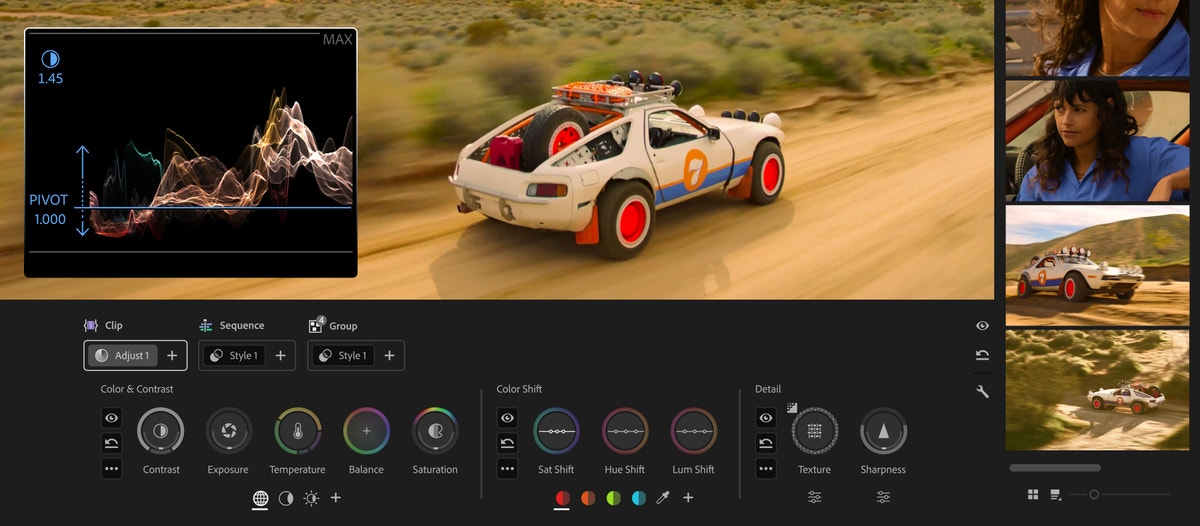
- Color Mode in Premiere, currently in beta, designed to make colour grading more natural for editors
- After Effects Object Matte for faster masking and rotoscoping
- Frame.io Drive for working with shared Frame.io projects as if the media is stored locally
That combination is important. Most business video problems are not caused by one missing tool. They come from friction between idea, footage, editing, review, approval, storage, and publishing.
Why This Matters for Small Business Marketing
A lot of local companies already have the raw material for good content: project photos, product shots, short phone videos, customer education topics, team activity, site visits, and event footage. The challenge is turning those assets into something presentable before the moment passes.
Adobe Firefly can help teams move from idea to first draft faster. Premiere can handle more serious editing and finishing. Adobe Stock gives staff access to licensed supporting visuals and audio. Frame.io helps the team review and collaborate without passing huge video files around WhatsApp, email, or random cloud folders.
That can support practical workflows such as:
- A retailer creating quick product or sale videos
- A service company preparing explainers for common customer questions
- HR producing onboarding and safety clips
- Management turning project footage into a short update
- Marketing teams preparing social versions of a longer video
- Sales teams adding polished video snippets to proposals or presentations
The benefit is not just speed. It is consistency. Teams can keep work in a managed Adobe workflow instead of scattering files across personal accounts and unmanaged devices.
Better Audio and Colour Can Make Content Feel More Professional
Small business videos often fail for simple reasons: poor sound, distracting background noise, uneven colour, or clips that look like they were assembled from different sources. Adobe's audio upgrades and Premiere Color Mode are aimed at exactly that kind of polish.
Clean speech matters when the video is explaining a product, training staff, or answering a customer question. Colour consistency matters when the content represents your brand. These details influence whether the business looks organized and credible.
The right tools can make these improvements easier, but staff still need a workflow: where raw footage goes, who edits it, who approves it, and where the final version is stored.
Frame.io Drive Solves a Real Collaboration Problem
Video files are large, and collaboration can become painful very quickly. One person downloads a clip, another edits a different copy, someone sends a transfer link, and nobody is sure which version is approved.
Frame.io Drive is Adobe's answer to that problem. It allows creative teams to work with Frame.io projects from the desktop while keeping media in a shared source of truth. For teams with multiple contributors, this can reduce download delays, version confusion, and the risk of important files living only on one workstation.
For Blue Chip clients, this is also an IT conversation. Video workflows need storage planning, user access control, backup thinking, and endpoint performance. Creative software works best when the surrounding infrastructure is not an afterthought.
Licensing, Governance, and Support Still Matter
Adobe video tools can be powerful, but they should not be rolled out casually. Businesses should decide:
- Which users need Adobe Express, Firefly, Premiere, After Effects, Stock, or Frame.io
- Where brand assets, footage, music, project files, and exports should live
- Who approves customer-facing video before it goes public
- How licensed stock assets and AI-generated assets should be tracked
- Whether staff machines have enough performance for editing work
- How finished videos are backed up and retained
- What rules apply to customer footage, staff footage, and sensitive business information
Without this structure, better creative tools can create more clutter. With the right structure, they become a repeatable content production system.
How Blue Chip Can Help
Blue Chip Technologies helps businesses choose, deploy, license, and support productivity and creative tools around real workflows.
For Adobe video and creative environments, that can include:
- Reviewing which Adobe plans fit each user role
- Helping set up Adobe accounts and licensing correctly
- Connecting creative workflows with Microsoft 365, SharePoint, OneDrive, endpoint management, and backup practices
- Planning storage and access for large media files
- Supporting workstations used for creative tasks
- Helping teams document approval and publishing workflows
- Training users on safe, practical AI-assisted content creation
The goal is not to make every business into a production studio. The goal is to help your team create clearer, more professional content without losing control of files, licensing, approvals, and security.
If your business is creating more video for customers, staff, or social media, now is a good time to review whether your tools and workflow are ready for that demand.
Source: Adobe Blog — Adobe extends leadership in video: unleashing new AI-powered creation in Firefly, reinventing color for editors in Premiere.


