
Microsoft Copilot Cowork is now generally available for Microsoft 365 Copilot customers worldwide. After three months in Frontier preview, it is ready for production use. For small and medium businesses in Trinidad and Tobago, this is not a reason to flip every switch and hope for the best. It is a reason to plan. Cowork is built for complex, long-running tasks that span multiple tools and data sources. You define the outcome, and it returns completed work - not just a draft or a recommendation. That power comes with usage-based billing, admin controls, and a genuine need for data hygiene. If your file permissions are messy or your SharePoint structure is chaotic, Cowork will expose that faster than it will fix it. Here is what local decision-makers should know before enabling it.
What Copilot Cowork Actually Does
Cowork handles the kind of work that normally sits in the gaps between meetings: sales follow-up sequences, month-end spreadsheet consolidation, service ticket triage, customer meeting preparation, policy document updates, and project coordination across departments. You assign the task, set the parameters, and Cowork works across your Microsoft 365 context to deliver a finished result. It is grounded in Work IQ, which means it understands your existing files, emails, calendars, and team structures. It is not a chatbot that gives suggestions. It is a delegation tool that produces output. That distinction matters because the output is only as good as the data and permissions it can access. If a folder is shared with the whole company, Cowork can pull from it. If a spreadsheet is buried and unlabeled, Cowork may miss it.
Why Usage-Based Billing Changes the Rollout Math
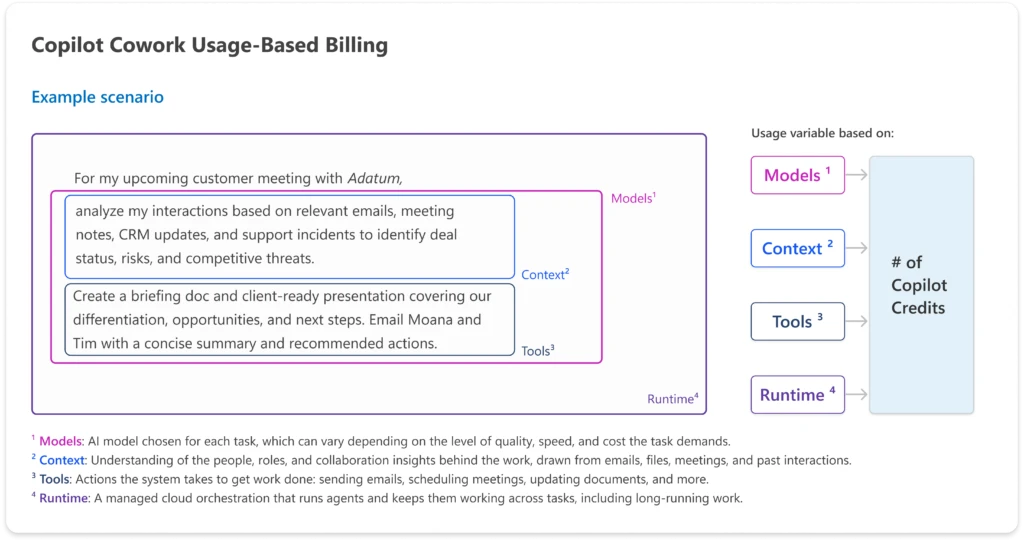
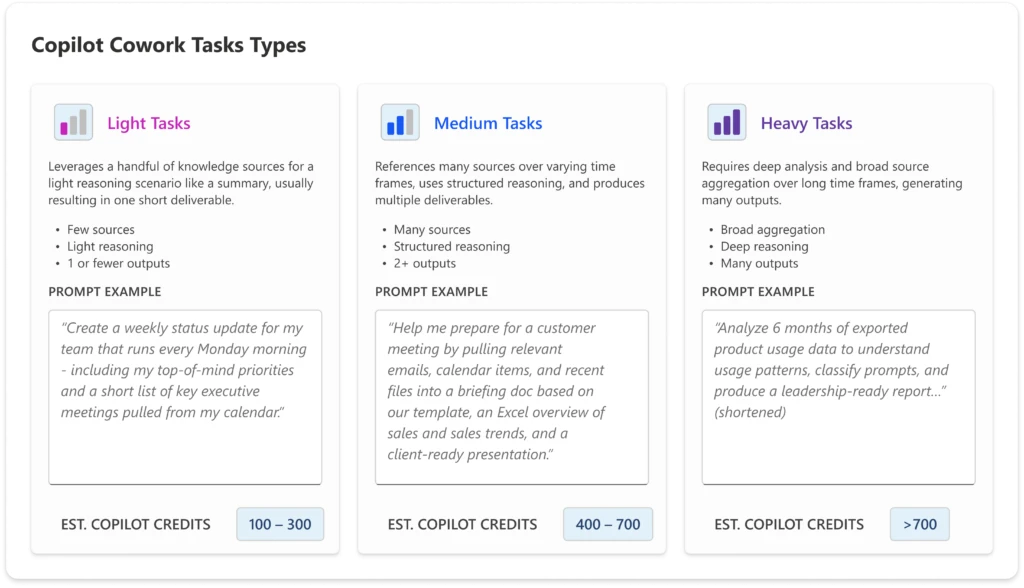
Cowork runs on Copilot Credits, billed based on model choice, context retrieval, tool calls, and runtime. Microsoft lists PayGo pricing at $0.01 per Copilot Credit. Costs can scale quickly if you enable it for everyone without guardrails. The platform is off by default. Admins must enable it, set spending limits at the tenant, group, or user level, configure usage alerts, and decide who can request extra credits. You also need to think about payment options - PayGo and P3 are available - and how you will track consumption before the first bill arrives. For SMBs with tight cash flow, this means pilot design is not optional. Pick a department, define a budget, set a thirty-day time frame, and review the reporting before you even think about expanding.
A Practical Checklist Before You Enable It
- Confirm your Microsoft 365 Copilot User Subscription Licenses are active and assigned correctly.
- Audit file permissions and data hygiene so Cowork does not surface outdated or restricted information.
- Set admin spending limits and usage alerts before any user gets access.
- Choose a pilot group with one clear workflow, such as month-end reporting or service ticket summaries.
- Review audit logs and compliance controls, including DSPM, eDiscovery, and Insider Risk Management, to ensure visibility.
- Train the pilot users on what to delegate and what to review manually before sending anything external.
Local Use Cases That Make Sense
Trinidad and Tobago SMBs should start with repetitive, high-volume workflows where human judgment is still required but the legwork can be delegated. A sales manager can have Cowork draft personalized follow-ups based on the last six months of customer emails, but that manager should still review every message before it goes out. An operations lead can use it to compile month-end figures from multiple Excel files and SharePoint lists, then verify the totals before sending them to finance. A service desk can have it summarize open tickets from the past week and suggest priority groupings, but a technician must still confirm the diagnosis. An HR team can use it to update policy documents from recent regulatory changes, but a compliance officer must still sign off. The value is in reducing preparation time, not removing oversight. Cowork is a research assistant and formatter, not a decision-maker.
Models, Features, and What Is Available Now
At general availability, Cowork supports Anthropic Opus 4.8 and Sonnet 4.6. GPT 5.5 remains in Frontier preview, and Microsoft's own Cowork 1 model is coming soon. New GA capabilities include a toggle in the Microsoft 365 Copilot app to switch into Cowork mode, plugin support, and enterprise security and compliance controls such as audit logging, Data Security Posture Management, eDiscovery, Insider Risk Management, Data Lifecycle Management, and Communication Compliance. Data Loss Prevention is listed as coming soon. Browser use via Edge is still in Frontier preview. Multi-model design and enterprise-grade security are part of the architecture, not afterthoughts. That is important for local businesses that operate under strict client or regulatory data requirements.
Source and Next Steps
Microsoft announced general availability on June 16, 2026. You can read the official details here: https://www.microsoft.com/en-us/microsoft-365/blog/2026/06/16/copilot-cowork-is-now-generally-available/
If you are evaluating Copilot Cowork for your business, Blue Chip Technologies can help with Microsoft 365 and Copilot licensing, readiness checks, permissions and data hygiene cleanup, rollout planning, user training, and ongoing support. Start with a pilot, measure the consumption, and expand only when the workflow and the governance are solid. AI should make your team faster, not your admin team busier fixing mistakes.


