

Google Workspace Cloud Next Updates: AI, Sheets, Meetings, and Safer Admin Control
Google's latest Workspace announcements from Cloud Next 2026 show where business productivity is heading: fewer disconnected tools, more AI-assisted workflows, and stronger administrative control over how company data is used.
For small and mid-sized businesses in Trinidad and Tobago, the practical question is not whether every new AI feature should be turned on immediately. The better question is: which Google Workspace improvements can reduce repetitive work, help teams collaborate faster, and keep management comfortable that business data remains governed?
Google's announcement covers new capabilities across Gemini, Google Sheets, Workspace Studio, Google Vids, Google Meet, Chrome Enterprise, Workspace integrations, agent governance, sovereign controls, encryption, and Microsoft 365 migration. That is a broad list, but several updates are especially relevant for growing businesses that already rely on Gmail, Drive, Docs, Sheets, Meet, and Chat every day.
Source: Google Workspace Blog — 10 more announcements from Google Workspace at Cloud Next '26.
Sheets Can Become More Than A Spreadsheet
Many companies already run important operations from Google Sheets: sales trackers, service lists, inventory checks, project plans, purchasing logs, cash-flow reports, and management dashboards.
Google says Gemini in Sheets is being expanded to help import third-party data from systems such as HubSpot and Salesforce, then turn spreadsheet data into interactive dashboards, heat maps, kanban boards, and other mini-app style views inside Sheets.
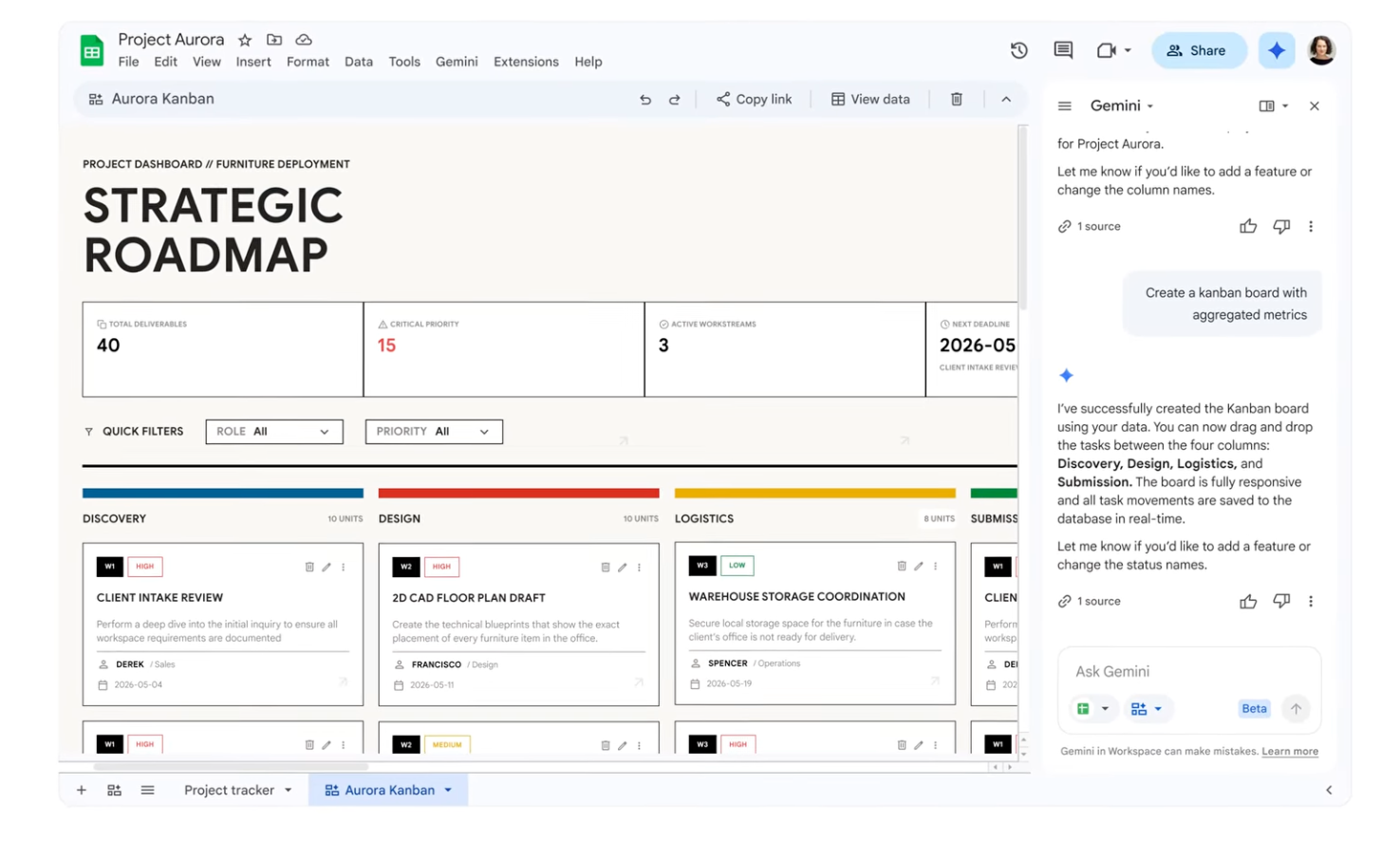
That matters because many SMBs do not need a massive custom software project for every operational problem. Sometimes the fastest improvement is a controlled, well-designed Sheet that pulls the right information together and presents it clearly.
Blue Chip can help clients make that practical by:
- Structuring Sheets so they are reliable, not fragile.
- Connecting approved business data sources where appropriate.
- Building dashboards that managers can actually use.
- Setting permissions so sensitive records are not overshared.
- Training teams on when Sheets is enough and when a proper system is needed.
The win is not just prettier charts. It is faster decisions from data staff already maintain.
Workspace Studio Skills Could Reduce Repetitive Admin Work
Google also highlighted agentic automation through skills in Workspace Studio. In plain English, this means businesses may be able to turn repeatable internal procedures into reusable AI-assisted workflows.
Think about common office routines:
- Checking invoices against prior bills.
- Preparing meeting follow-up notes.
- Drafting standard customer replies.
- Collecting information from shared files.
- Reviewing onboarding checklists.
- Summarising project status from emails and documents.
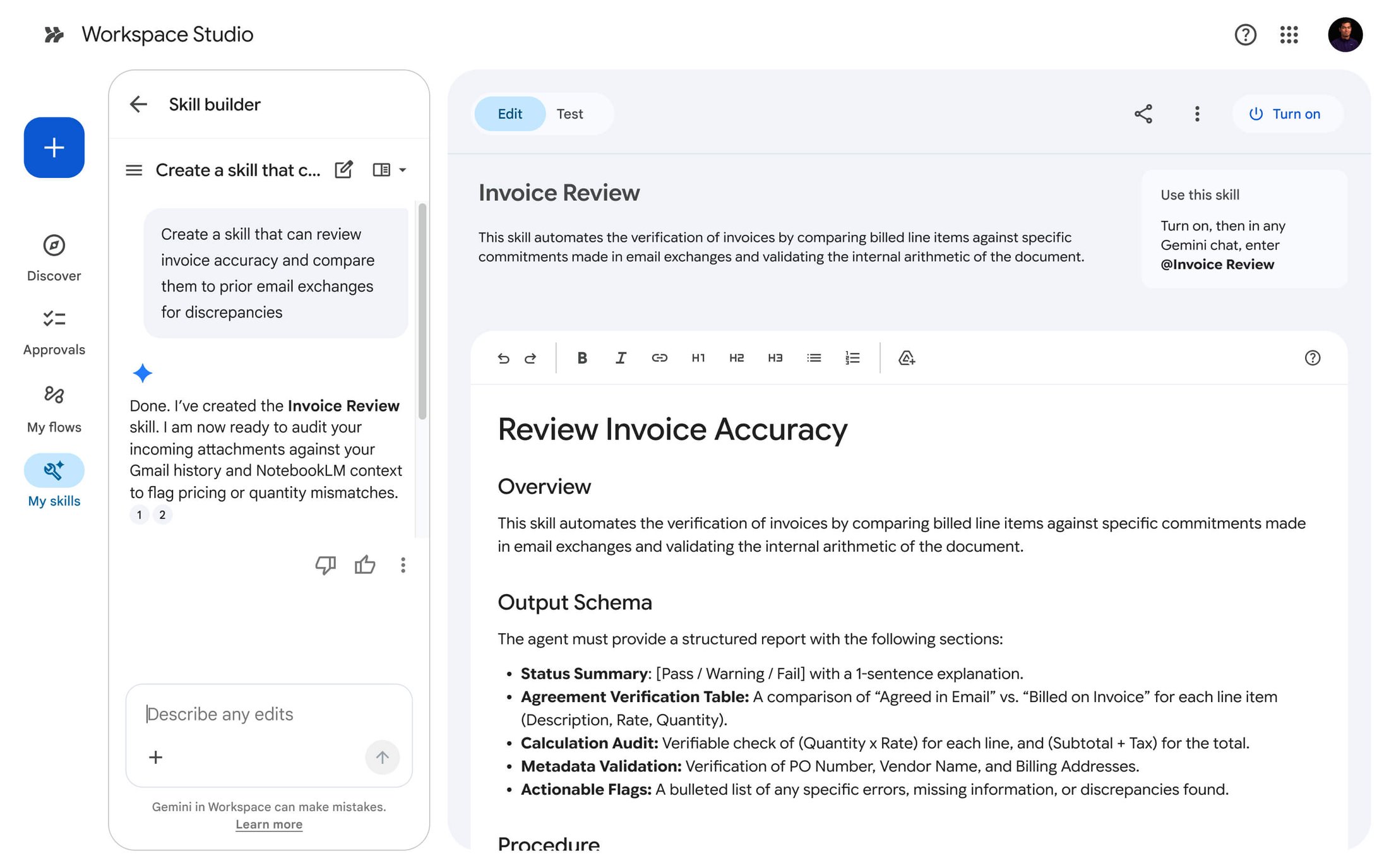
For Blue Chip clients, this is where Google Workspace with Gemini can become more than a writing assistant. It can help standardise how work gets done. The important part is governance: the workflow should be reviewed, documented, permissioned, and tested before staff rely on it.
A managed rollout should define who can create skills, who approves them, what data they can access, and when a human must review the result.
Meeting Notes Need To Become Follow-Through
Google Meet's Take Notes for Me has already been useful for reducing manual note-taking. Google is expanding the idea so Gemini can capture meeting summaries and action items beyond standard Meet calls, including in-person or third-party meeting contexts when started from Google Meet.
That has direct business value. Many companies do not suffer from too few meetings; they suffer from weak follow-through after meetings. Action items live in someone's notebook, a chat message, or a half-finished email draft.
With the right setup, meeting summaries can become part of a cleaner workflow:
- Notes saved into the correct Drive location.
- Action items assigned to responsible staff.
- Follow-up emails drafted from the meeting summary.
- Decisions preserved for later reference.
- Managers able to review progress without chasing everyone manually.
Blue Chip's role is to help clients pair the feature with practical rules: when it should be used, who has consent, where notes are stored, how long they are retained, and how sensitive meetings are handled.
Vids, Gemini, and Chrome Enterprise Point To Faster Everyday Work
Google Vids is also getting more capable, including branded avatars and easier conversion from presentations into videos. For businesses, this can help with internal training, customer explainers, HR onboarding, and product/service updates without needing a studio-style video process for every message.
The announcement also mentions Workspace capabilities inside the Gemini Enterprise app and Gemini auto browse in Chrome Enterprise. These are useful signals for where work is going: staff will increasingly expect AI assistance to move across documents, calendars, web apps, and business tools.
That can save time, but only if it is introduced carefully. Auto-browsing and agent workflows should not become a free-for-all. Businesses need policies, account controls, and monitoring so AI support improves productivity without creating data leakage, mistaken actions, or compliance surprises.
Admin Governance Is The Part Businesses Should Not Skip
The most important part of the announcement for many owners and managers may be the least flashy: agent governance, AI control center, agent management, Workspace Studio controls, sovereign controls, and client-side encryption.
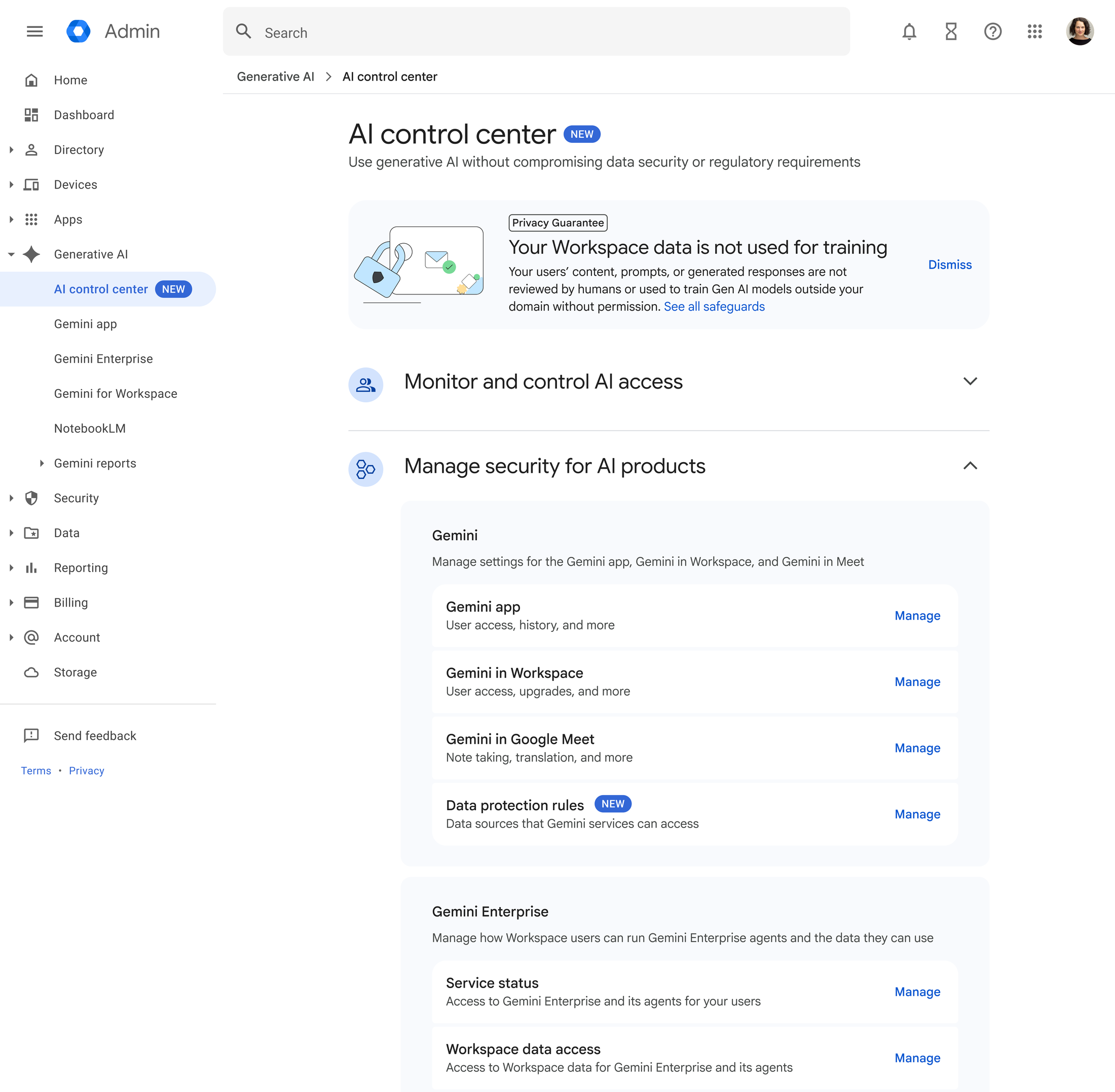
As AI becomes embedded into email, documents, meetings, chat, and browser workflows, administrators need visibility and control. Otherwise, companies risk staff creating unsupervised automations that can access too much information, share the wrong data, or produce outputs no one is accountable for.
For a managed Google Workspace environment, Blue Chip would focus on:
- Reviewing licensing and feature availability before rollout.
- Limiting who can create or deploy AI workflows.
- Auditing sharing permissions in Drive and Shared Drives.
- Separating sensitive finance, HR, legal, and management data.
- Applying retention, encryption, and data-region options where required.
- Training users to verify AI-generated outputs before sending or acting.
Good governance does not slow down AI adoption. It makes adoption safer and more sustainable.
Migration And Microsoft Office Compatibility Still Matter
Google also announced improvements around migration from Microsoft 365 to Workspace, Office file editing, redlining in Docs, and an AI-powered Office macro converter.
This is useful for businesses that want Google Workspace but still collaborate with customers, suppliers, accountants, attorneys, or partners who use Microsoft Office. The reality is mixed environments are common. The smoother the interoperability, the less friction staff feel when sharing files or moving historical data.
Blue Chip can help clients assess whether Google Workspace is the right fit, plan a migration properly, preserve data, configure security, train users, and avoid a rushed cutover that disrupts daily work.
What Blue Chip Clients Should Do Next
These Google Workspace updates are promising, but businesses should treat them as part of a managed roadmap rather than a random collection of features.
A practical next step is to review:
- Which departments rely most heavily on Gmail, Drive, Sheets, Meet, and Chat.
- Which repetitive workflows consume the most time.
- Which data sets are sensitive and need stricter controls.
- Which users should pilot Gemini and Workspace Studio features first.
- Which licensing tier is required for the features that matter.
With the right support, Google Workspace can become a more intelligent operating layer for the business: dashboards that are easier to use, meetings that produce clearer action, videos that are faster to create, AI workflows that reduce admin load, and controls that keep company data protected.
Blue Chip Technologies helps Trinidad and Tobago businesses plan, secure, license, configure, and support Google Workspace so productivity improvements are introduced with the governance and user support they need.