
Google Workspace Migration Just Got Faster and Smarter: What Trinidad and Tobago SMBs Should Know
If you have been putting off a move from Microsoft 365 to Google Workspace, it is worth looking at what Google released this month. On 10 June 2026, Google announced a set of migration and interoperability updates that address the exact pain points that usually stall small and medium business decisions: speed, data fidelity, and day-to-day workflow disruption.
At Blue Chip Technologies, we work with Trinidad and Tobago businesses that run lean operations. Most cannot afford a two-week email blackout or a file-sharing mess while staff relearn their tools. The good news is that Google has built two new capabilities - Data Import and Migration Planner - that make the technical side of switching far more predictable.
What Data Import Actually Does
Data Import is a cloud-native migration service that sits inside the Google Workspace Admin console. It is designed specifically for Microsoft 365 content. That means your emails, files, Teams conversations, calendar settings, Outlook rules, sensitivity labels, and metadata can move across without manual exporting and importing.
This is a significant shift from the older approach, where businesses often needed third-party tools or custom scripts to preserve email history and file permissions. Google now claims migrations can run up to five times faster with Data Import. For a local SMB with years of Outlook data and shared drives, that difference turns a potentially risky weekend cutover into a smoother, shorter project.
Encrypted files and emails are also supported. If your business handles sensitive client information - legal files, medical records, financial statements - that encryption handling matters. You do not want to discover after go-live that half your archive is unreadable because the migration tool could not carry the protection across.
Migration Planner: Know Before You Go
Google's migration updates are aimed at giving IT teams clearer timelines before a cutover.
The second tool is Migration Planner. It is a lightweight utility that runs locally on your network before any data moves. It scans your Microsoft 365 environment, estimates how long the migration will take, and produces an execution plan.
For Trinidad and Tobago businesses, this is particularly useful. Many local companies operate with mixed internet reliability or bandwidth caps. A planner that gives you realistic timelines means you can schedule the cutover around your quietest business hours, warn clients if email might be slower for a day, and avoid surprises.
Migration Planner also prioritises privacy. It runs client-side, so your data scan stays on your premises rather than uploading a full inventory to a vendor cloud first. That is a sensible default for businesses that need to keep their file lists and user directories confidential.
Better Office Interoperability, Not Just Migration
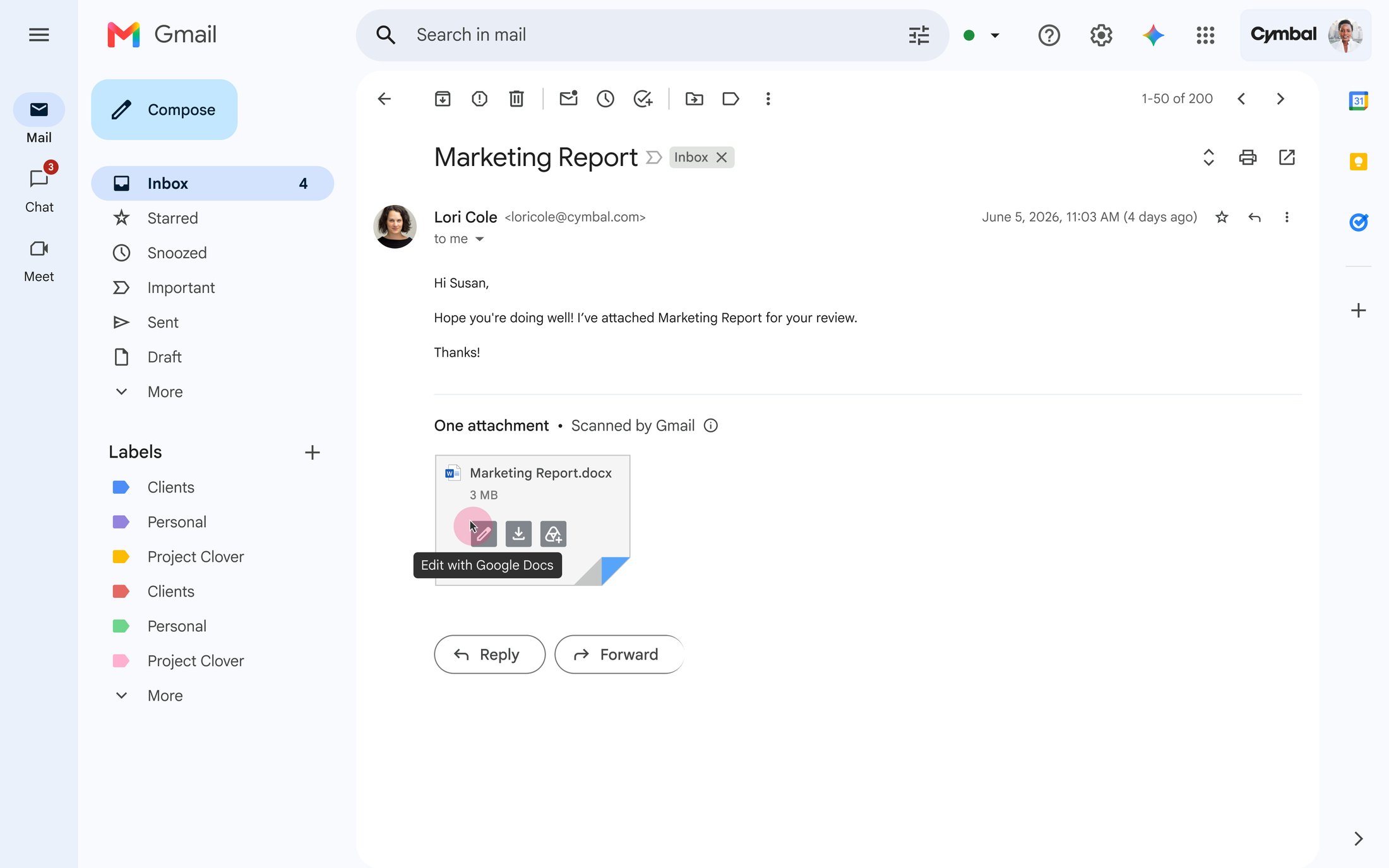
Office editing mode in Gmail is designed to reduce friction when clients and vendors still send Microsoft files.
Google is not only making it easier to leave Microsoft 365. It is also improving how the two ecosystems work together, which matters for local businesses that collaborate with Microsoft-heavy partners, government agencies, or international vendors.
Two beta features are planned for June 2026. Office Editing Mode in Gmail will let users open and edit Microsoft Office attachments directly inside Gmail without converting them first. Advanced Word compatibility in Google Docs will add support for captions, cross-references, and small caps. These are not cosmetic tweaks. They are the kind of formatting details that break proposals, reports, and tender documents when compatibility fails.
Redlining in Google Docs is planned for Q4 2026. If your business works with contracts or policy documents that need tracked changes, this removes one of the last common reasons to keep a Word licence active.
On the spreadsheet side, Google Sheets performance improvements are already generally available. Large spreadsheets now open and filter faster. For operations managers running inventory, payroll, or project tracking in Sheets, that is a daily quality-of-life improvement.
Why This Matters for Trinidad and Tobago SMBs
Local businesses face a specific set of constraints. Staff often wear multiple hats, so downtime is expensive. IT budgets are tight, which means licensing needs regular review. External collaboration is common - a construction firm sending drawings to an architect, a logistics company sharing manifests with a shipping agent, a professional services firm submitting documents to a regulator. If your partners live in Microsoft Office and you live in Google Workspace, friction costs real time.
These new features reduce that friction. They also lower the risk of migration. If you delayed a Google Workspace move because you were worried about losing Teams chat history, broken calendar rules, or mangled document formatting, those objections are now weaker.
That said, migration is still a business operations decision, not just a mailbox transfer. You need to think about:
- Migration planning - Which departments move first? What is your rollback plan?
- Licensing review - Are you paying for Microsoft licences you no longer need?
- Security and admin setup - Do your sensitivity labels, two-factor authentication, and device policies transfer correctly?
- Staff training - Even a better tool fails if your team does not know where the settings moved.
- Post-migration support - Who handles the first week of "where is my folder?" questions?
When to Reassess Your Position
If you looked at Google Workspace two or three years ago and decided the migration risk was too high, it is worth reassessing now. The combination of faster data transfer, pre-migration planning, and improved Office interoperability changes the calculation. You do not need to migrate everything on day one. Many businesses run a hybrid model - email and core files on Google Workspace, with a handful of Office licences for specific roles - and these updates make that model more stable.
How Blue Chip Technologies Can Help
We run readiness assessments for Trinidad and Tobago businesses that want a clear picture before committing. Our team reviews your current Microsoft 365 usage, identifies which data and settings will transfer cleanly, flags the items that need manual handling, and builds a timeline that fits your business hours. We also handle licensing reviews, security baselining, admin configuration, staff training, and ongoing support after go-live.
If you are curious whether a Google Workspace move makes sense for your business, get in touch. We will give you a straight answer - including if staying put is the better option.
Source: Simplify the move to Google Workspace with new migration and interoperability features, Google Workspace Blog, 10 June 2026.