

Microsoft Teams Backups Need to Protect More Than Channels
Microsoft Teams has become the working memory of many businesses. Staff use it for project decisions, customer updates, management approvals, file links, quick instructions, and one-to-one conversations that may never make it into a formal document.
That makes Teams backup more important than many companies realise. Backing up the Microsoft 365 tenant is not just about SharePoint document libraries or public Teams channels. Private chats, group chats, file attachments, and restore visibility all matter when a business needs to investigate an issue, respond to an audit request, recover after a mistake, or keep operations moving after a security incident.
Synology's recent article on Microsoft Teams backup highlights a useful point for SMBs: not every backup product protects Teams data the same way. The difference usually only becomes obvious when you need to restore something.
Teams data is not stored in one simple place
A Teams conversation may look like one neat thread to the user, but the backend is more complicated. Channel conversations, private chats, group chats, OneDrive links, Exchange mailbox data, and file attachments can all be involved.
That matters because a backup job that says it covers “Teams” may still have limitations. It may protect channel data but not private chats. It may capture messages but not attachments. It may restore text but lose formatting, links, or context.
For a small business, that is a serious gap. A manager may need an approval trail from a private chat. A sales team may need files shared inside a group conversation. HR or finance may need to retrieve specific messages for internal review. If the backup cannot search, preview, and export that data cleanly, recovery becomes slow and uncertain.
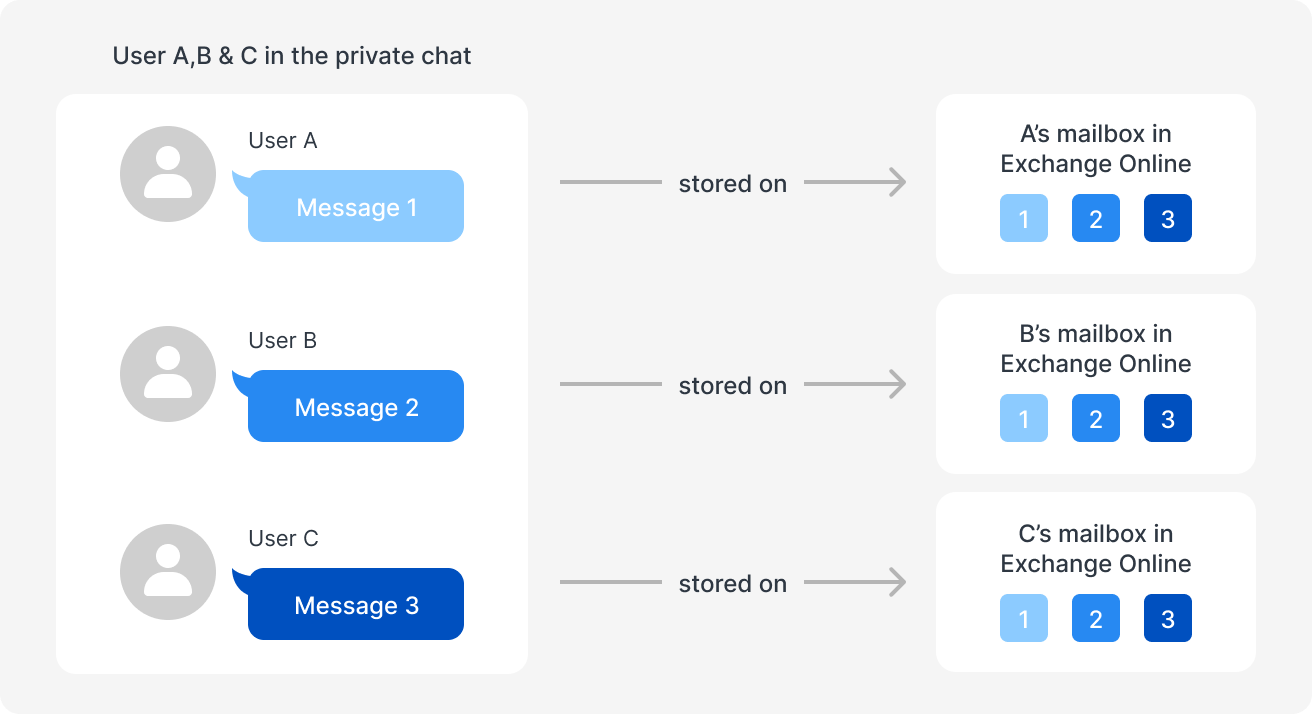
Private Teams chats are technically different from channel conversations, which is why backup coverage should be checked carefully.
What good Teams backup should include
When Blue Chip reviews Microsoft 365 backup coverage, we look beyond whether a backup job completed successfully.
A practical Teams backup should help answer questions like:
- Are private one-to-one and group chats included, or only Teams channels?
- Are shared files and attachments preserved, not just message links?
- Can restored conversations keep useful formatting and context?
- Can administrators search by keyword, date range, user, or conversation?
- Can selected messages be previewed before restore or export?
- Are failed items retried without breaking the whole backup job?
- Is duplicate data handled efficiently as chat volume grows?
- Can the business prove when an export or recovery was generated?
These details sound technical, but they directly affect recovery time. A backup that is hard to search or incomplete during restore may not meet the business need when pressure is high.
Where Synology ActiveProtect fits
Synology positions ActiveProtect as a purpose-built backup appliance for centralized data protection, including Microsoft 365 workloads. For Teams specifically, Synology describes support for richer chat capture, attachment handling, search, preview, export, deduplication, and retry logic.
For Blue Chip clients, the key value is not only the appliance itself. It is the managed process around it:
- confirm what Microsoft 365 data is actually in scope
- schedule backups around business usage and API limits
- monitor successful and failed backup jobs
- test restores before a real incident
- document retention rules for management, HR, finance, and operations
- include Teams data in the wider ransomware and business continuity plan
Backup is only useful when it is monitored and tested. Teams should be part of that plan because important business decisions increasingly happen inside chat, not just email.
A Trinidad and Tobago SMB example
Consider a local distributor, contractor, retailer, or professional services firm using Teams every day. A supervisor approves a purchase in chat. A project team shares site photos and revised files. Finance discusses a payment query. Management asks for a quick decision outside of email.
If a user deletes a conversation, an account is compromised, or a legal/audit question comes up months later, the business needs more than “we back up Microsoft 365.” It needs confidence that the right data can be found and recovered.
That is why backup reviews should include real restore tests, not just licence checks. Pick a sample Teams channel, a private chat, a shared attachment, and a date range. Confirm what can be searched, previewed, exported, and restored.
Blue Chip's recommendation
If your business depends on Microsoft Teams, treat Teams conversations as business records. They may not all need long retention, but they do need a deliberate policy.
Start by reviewing:
- which Microsoft 365 workloads are currently backed up
- whether Teams private chats and group chats are included
- how long Teams backups are retained
- who can search or export restored chat data
- whether restore testing is scheduled and documented
- whether backup alerts are monitored by someone responsible
- how Teams recovery fits into your incident response plan
Synology ActiveProtect is one option for businesses that want appliance-based Microsoft 365 protection with centralized management. The larger lesson is universal: collaboration data must be protected with the same seriousness as email, files, accounting data, and line-of-business systems.
For many SMBs, Teams is now where work happens. Your backup strategy should reflect that.
Source: Synology Blog — Not all Microsoft Teams backups are the same: what vendors don’t tell you.


