

Let Staff See the Right Email Signature Before They Send
When staff write an email, they often want to know exactly what the recipient will see. That includes the email signature.
For many businesses, the signature is no longer just a name, phone number, and website. It may include a legal disclaimer, department-specific contact details, a campaign banner, a customer portal link, a payment notice, or a compliance message. If users cannot see it before sending, they may worry that the email looks incomplete, inconsistent, or off-brand.
Rocketseed's article on Signature on Compose is useful because it deals with a practical workflow question: should staff be able to see their managed email signature while they are composing the message, even when signatures are centrally controlled?
For Trinidad and Tobago SMBs using Microsoft 365 or Google Workspace, the answer is often yes.
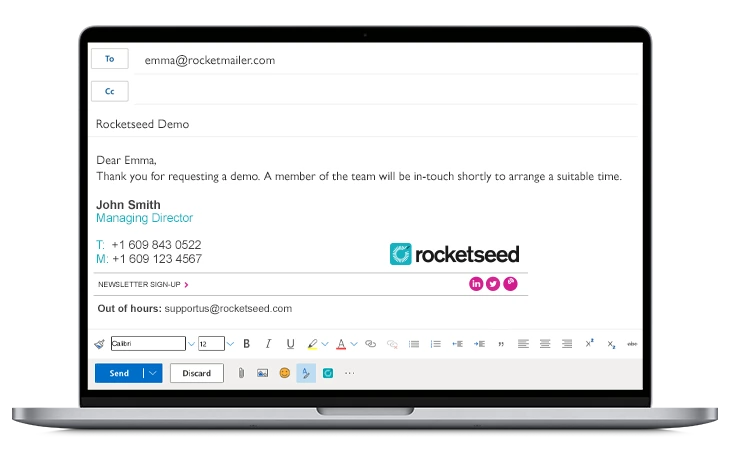
Why signature visibility matters
Centralized email signature management solves a real IT problem. It keeps branding consistent, prevents outdated details, controls disclaimers, and lets marketing run approved banners without asking every user to edit Outlook or Gmail manually.
But users still care about what they are sending. If the signature only appears after server-side processing, the business may have central control, but the sender does not get visual confirmation inside the compose window.
That small detail can matter in daily work:
- Sales teams want to know the right campaign banner is attached before sending a proposal follow-up.
- Accounts teams want confidence that payment instructions and disclaimers are current.
- Customer service teams want every email to carry the correct helpdesk or portal details.
- Managers want signatures to look professional on replies and forwarded messages.
- IT teams want fewer tickets from users asking whether signatures are working.
Signature preview is not just cosmetic. It gives staff confidence while preserving central control.
What Rocketseed adds for Microsoft 365 and Google Workspace
Rocketseed describes Signature on Compose as a plugin capability for Rocketseed users on Microsoft 365 and Google Workspace.
In Microsoft 365, the administrator installs the plugin and makes it available to selected users in the tenant. Rocketseed can then place the appropriate full signature, or shorter reply signature where configured, into the compose or reply window.
For Google Workspace, Rocketseed's Signature on Compose works in Gmail on the web and applies the full managed signature, including replies.
The important point for Blue Chip clients is that this supports both sides of the email signature problem:
- IT keeps signatures centrally managed instead of relying on staff edits.
- Users can see the signature while writing, which reduces uncertainty before sending.
That balance is especially useful when a company wants professional-looking email but does not want to turn every signature update into a manual support job.
Server-side branding still matters
Rocketseed also notes an important limitation: Microsoft 365 and Google Workspace signature APIs are not available for mobile devices in the same way, so mobile users may not see the signature while composing.
That does not mean the message is unbranded. Rocketseed can still apply branding when the email is routed through the server.
For businesses, this distinction matters. The right implementation plan should explain where users will see signatures before sending, where server-side branding applies after sending, and what staff should expect across Outlook, Gmail, webmail, and mobile devices.
This is where managed IT support is valuable. The platform feature is only one part of the rollout. Users also need clear expectations, tenant configuration, testing, and support.
A better workflow for local SMBs
Many SMBs start with signatures managed manually inside Outlook or Gmail. That works for a very small team, but it breaks as soon as people change roles, work from different devices, send from shared mailboxes, or need different banners by department.
A better workflow looks like this:
- Standardize the master signature design and disclaimer requirements.
- Decide which teams need full signatures, reply signatures, campaign banners, or department-specific details.
- Deploy centralized signature management through Rocketseed.
- Enable Signature on Compose for the users who benefit from seeing signatures before sending.
- Test Microsoft 365, Google Workspace, webmail, desktop, replies, forwards, and mobile behavior.
- Review campaign performance and user feedback after rollout.
That gives the business control without taking away the sender's confidence.
Where Blue Chip fits
Blue Chip can help Trinidad and Tobago businesses plan and implement this properly across Microsoft 365, Google Workspace, and Exchange-style environments.
Our role is to make the rollout practical: tenant readiness, user and group planning, signature policy, banner and disclaimer coordination, testing, helpdesk support, and ongoing changes as departments, campaigns, and staff details evolve.
Rocketseed provides the central signature management, marketing banner, analytics, CRM integration, and Signature on Compose capabilities. Blue Chip provides the local implementation and managed-service layer that keeps the setup reliable after launch.
If staff need to send professional emails every day, the business should not depend on copied-and-pasted signature blocks. A managed signature platform with compose visibility gives users confidence, keeps the brand consistent, and gives IT one controlled place to manage changes.
Source: Rocketseed - Seeing your email signature before you send.


