Offsite Backups Should Be Visible, Locked, and Tested
Local backups are useful because they are fast. They are also dangerous if they are the only copy. A fire, theft, failed appliance, accidental deletion, or ransomware incident can take out the production system and the local backup target at the same time.
Synology recently highlighted ActiveProtect support for Wasabi Hot Cloud Storage as a remote storage option. The point is not just "backup to cloud." The real value is a more resilient backup design: centralized visibility, offsite scale, immutable copies, encryption, and longer retention without turning backup management into a mess.
For Trinidad and Tobago SMBs, that is the practical conversation. The business does not need a complicated enterprise architecture. It needs confidence that critical data can survive the failure of one office, one server room, or one compromised administrator account.
Offsite backup should still be centrally managed
One common mistake is treating offsite backup as a separate island. The local NAS or backup appliance shows one set of jobs. The cloud bucket shows another set of objects. Nobody has a clean view of whether every important system is protected.
Synology's article calls out the ActiveProtect cluster module, which can keep data visible even when copies are stored remotely on Wasabi. That matters because backup blind spots are usually boring until the day they become expensive.
An SMB backup review should confirm:
- what systems are included
- which data has an offsite copy
- whether failed jobs are monitored
- how long cloud copies are retained
- who can change or delete backup plans
- whether restore testing includes the offsite copy
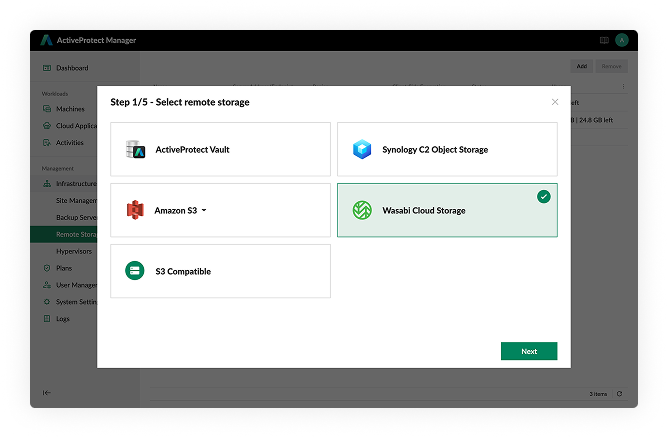
Synology's ActiveProtect Manager can use Wasabi as remote storage, which is useful when backup copies need to live outside the main office.
Cloud storage is not a recovery plan by itself
Wasabi or any other object storage platform can be a strong offsite target, but cloud storage alone does not guarantee recovery. The backup design still needs retention rules, access controls, encryption, alerting, and restore testing.
This is where a managed approach matters. Blue Chip Technologies would normally look at the full recovery chain:
- local copy for fast restores
- offsite copy for site-level protection
- immutable retention where deletion risk is high
- separate credentials for backup administration
- documented recovery order for critical systems
- periodic restore tests with written results
The cloud copy is one layer. It becomes valuable when it is part of a tested process.
Immutability matters because attackers target backups
Ransomware crews know that clean backups reduce pressure to pay. That is why modern incidents often include attempts to delete, encrypt, or corrupt backup repositories.
Synology points to immutable protection plans in ActiveProtect Manager and immutable storage in Wasabi. In plain language, the backup copy should be hard to tamper with during its retention period. A compromised workstation or ordinary admin account should not be able to wipe every backup.
For small and mid-sized businesses, this is especially important for:
- accounting and payroll systems
- Microsoft 365 and shared documents
- file server data
- virtual machines
- POS and line-of-business databases
- legal, HR, and contract records
If that data is worth backing up, it is worth protecting from deletion.
Retention should match the business
Not all data needs the same retention. A daily working file may only need short-term recovery. Finance records, HR files, contracts, audit material, project history, and compliance-related documents may need a longer retention window.
Cloud object storage can help with longer retention, but the policy should be deliberate. Keeping everything forever creates cost and search problems. Keeping too little creates legal, operational, and audit risk.
A practical retention plan should define what stays local, what moves offsite, what becomes immutable, and who approves changes.
What owners should ask
If your business already has NAS or server backups, ask these questions:
- Is there an offsite backup copy?
- Can ransomware delete it?
- Is it encrypted before it leaves the office?
- Who can change the backup policy?
- How long are offsite copies retained?
- Can we restore from the offsite copy without guessing?
- When was the last successful test restore?
- Would management receive a clear report after a backup failure?
These questions are more important than the brand name on the appliance. The appliance helps, but the operating discipline is what protects the business.
Blue Chip's recommendation
Use offsite backup as part of a layered recovery model. Local backups give speed. Cloud copies give separation. Immutability gives protection against tampering. Monitoring and restore testing give proof.
Synology ActiveProtect with Wasabi Hot Cloud Storage is useful because it supports that layered model while keeping management centralized. For SMBs, that combination can make offsite backup easier to operate and easier to verify.
The goal is not to collect more backup destinations. The goal is to know that the business can recover when the main site, main server, or main account is no longer trustworthy.
Source: Synology Blog - Expand cyber resilience to the cloud with Synology ActiveProtect and Wasabi Hot Cloud Storage.