
Adobe for Creativity in Claude: Faster Campaign Assets for SMB Teams
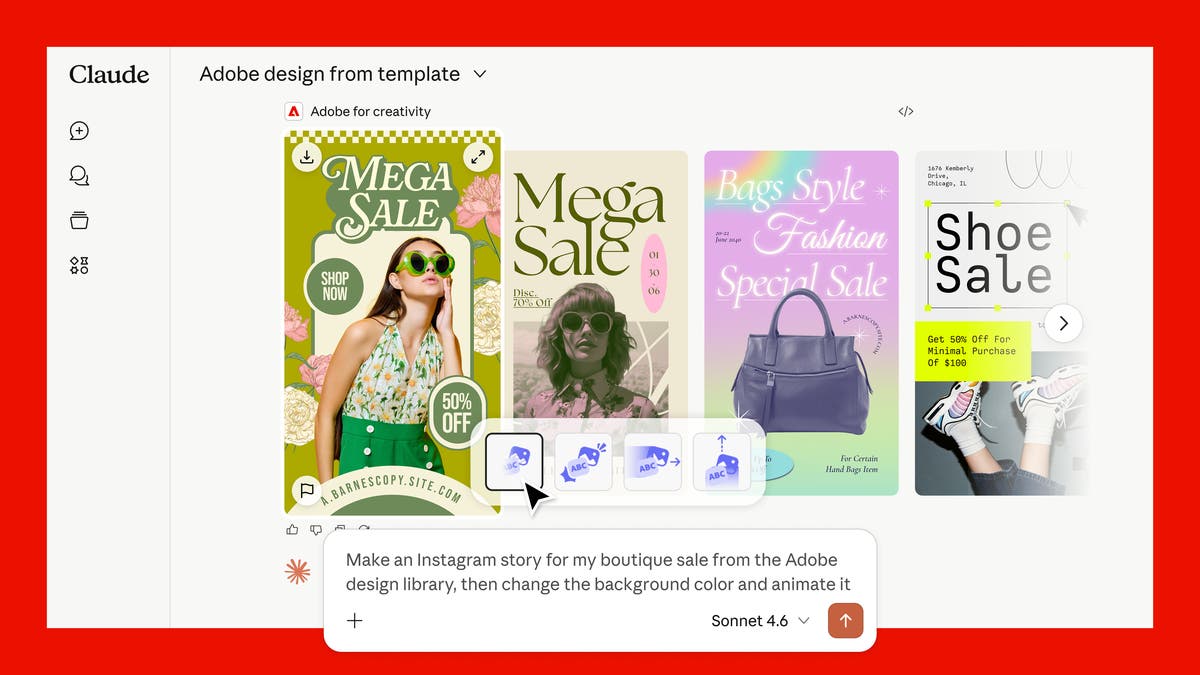
Adobe has introduced Adobe for creativity, a connector that brings more than 50 Creative Cloud tools into Claude. In plain terms, a user can describe a creative outcome in chat and let Adobe's tools help assemble the steps across Photoshop, Illustrator, Firefly, Express, Premiere, Lightroom, InDesign, and Adobe Stock.
For Trinidad and Tobago SMBs, the useful part is not the novelty of another AI feature. The useful part is speed: product photos, campaign graphics, social formats, short videos, and brand assets can move from idea to usable draft with fewer handoffs and less app-switching.
Why this matters for smaller teams
Many local businesses do not have a full creative department. The same person may be planning promotions, updating WhatsApp flyers, preparing proposal visuals, and asking a designer to resize artwork at the last minute.
That workflow breaks down quickly. A single campaign can need square posts, vertical stories, horizontal banners, resized product images, short clips, and cleaner versions of the same copy. When every version is handled manually, the team either moves slowly or publishes inconsistent work.
Adobe for creativity points to a more practical model: describe the result, review the drafts, and keep refining while Adobe's creative tools handle more of the repetitive production work.
What Adobe says the connector can do
Adobe's announcement says the connector can orchestrate multi-step workflows across its creative suite. The examples include retouching portraits, designing campaign assets from Express examples, updating colours and text, animating designs, and resizing horizontal videos for short-form platforms.
That is the right direction for everyday business marketing. Most companies do not struggle because they lack ideas. They struggle because turning one idea into five clean deliverables takes time, discipline, and file management.
With the Adobe connector, a marketing user could start with a brief like:
- Clean up these product photos for a Father's Day promotion
- Turn this flyer into square, story, and WhatsApp-ready versions
- Create a short vertical video from this horizontal clip
- Make these staff headshots look consistent for the website
- Build a first draft of campaign visuals we can refine in Express or Photoshop
The human still needs to approve the result. The difference is that the first production pass can become much faster.
Where Blue Chip fits in
AI creative tools are most valuable when they sit inside a controlled workflow. Without that, businesses can end up with scattered files, inconsistent branding, unclear licensing, and staff using different accounts with no governance.
Blue Chip Technologies can help clients make Adobe tools part of a proper operating setup:
- Adobe licensing and account planning for staff roles
- Creative Cloud deployment and access management
- Workflow design for marketing, sales, and operations teams
- Brand template setup in Adobe Express and related tools
- Practical AI-use guidance so staff know what to generate, review, and avoid
- Integration planning for content storage, approvals, and campaign handoff
This is especially important when teams are creating customer-facing material. Speed is useful only if the brand stays consistent and the business can find, reuse, and approve the right assets later.
A practical example
Consider a retailer preparing a weekend promotion. The team has product photos, a price list, and a rough offer. In the older workflow, someone asks for a flyer, waits for edits, asks for social sizes, then asks again for a WhatsApp version.
With Adobe's newer AI-assisted workflow, the team can move closer to this pattern:
- Start from the campaign goal and available product images
- Generate or refine first-pass creative options
- Resize and repurpose for multiple channels
- Continue editing in Adobe Express, Photoshop, or Premiere where needed
- Store the final assets in a controlled business account
That does not replace creative judgment. It reduces the repetitive production load around the judgment.
What to watch before adopting it
Businesses should check which staff need Adobe accounts, which tools require sign-in for higher limits, where generated assets are saved, and whether the team has a clear review process before publishing. Companies should also decide what content is appropriate to upload into AI-assisted tools, especially where customer data, staff photos, or confidential campaign material is involved.
The safest adoption path is a small pilot: one team, one campaign type, defined approval steps, and a simple way to measure whether the process saved time without hurting quality.
Bottom line
Adobe for creativity in Claude is another sign that AI is moving from "write me a draft" into real production workflows. For SMBs, that could mean faster campaign assets, cleaner repurposing, and less pressure on small teams.
Blue Chip can help businesses decide which Adobe products fit, set up licensing properly, and build a workflow that gives staff creative speed without losing control of brand, files, or approvals.
Source: Adobe Blog, Adobe for creativity: a new way to create with Adobe, now in Claude.