

Creative AI Needs a Managed Content Workflow
Adobe's latest research is a useful reminder that creative AI is no longer a side experiment for marketing teams. It is becoming part of everyday production.
Adobe says its survey of more than 400 creative professionals and more than 400 marketers found that creative pros are using AI on more than 40 percent of their projects on average. Many are using AI tools for at least half of the work week, and nearly 9 in 10 said generative AI has improved their work.
For small and medium-sized businesses in Trinidad and Tobago, the message is practical: AI can help a lean team produce more campaigns, graphics, videos, and sales material. But the business still needs licensing, storage, brand control, approval, and security around that work.
Content pressure is real
Most SMB marketing teams are small. Often the same person is managing social media, flyers, email graphics, product photos, event notices, website updates, and customer messages.
That workload keeps growing. Adobe's article notes that both creatives and marketers say demand for content has at least doubled over the last two years, with even more growth expected. Campaigns are also refreshed more often, sometimes weekly or daily.
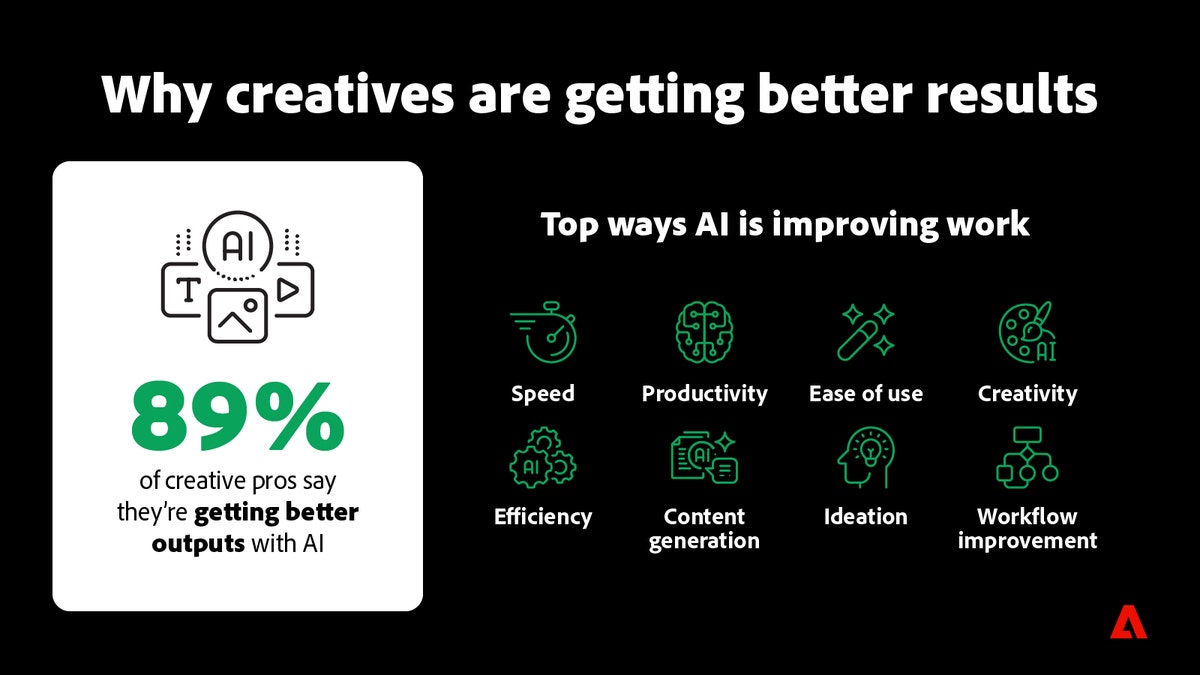
Adobe tools such as Firefly, Express, Photoshop, Premiere, and Creative Cloud can help teams explore ideas faster and create more variations. The mistake is treating that speed as the whole workflow.
Fast content still needs to be correct, approved, backed up, and on brand.
Productivity needs process
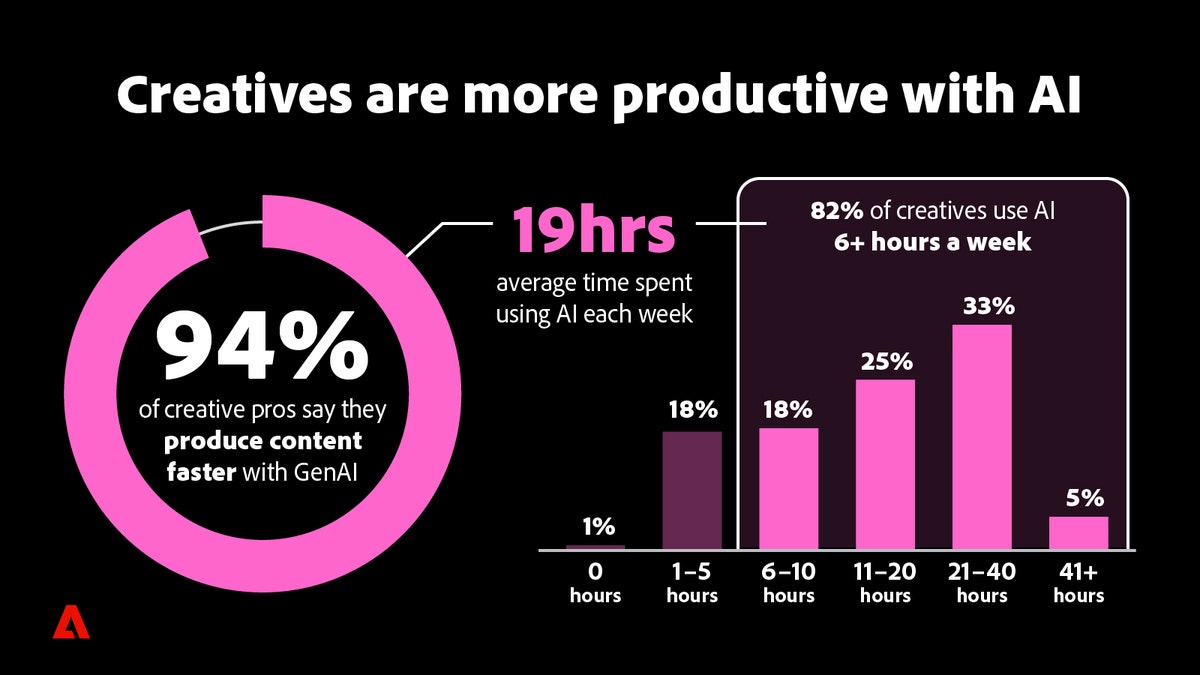
Adobe reports that 94 percent of surveyed creative pros said AI helps them produce content more quickly, with many saying they are at least 50 percent faster. That is valuable for businesses that need regular marketing output but cannot hire a full creative department.
The operational question is what happens after the first draft.
Who checks the spelling? Who confirms the price? Who approves a promotion before it goes live? Where is the final file stored? Can another staff member find the source asset next month? Is the business using a company Adobe account or a personal login?
Without a managed workflow, AI can create a new kind of file sprawl. There are more drafts, more exports, more versions, and more chances for the wrong asset to be posted.
Multiple models make governance more important
Adobe's research also points to a trend that matters for business control: creative teams are using more than one AI model per asset. That can improve results because different models are better at different tasks.
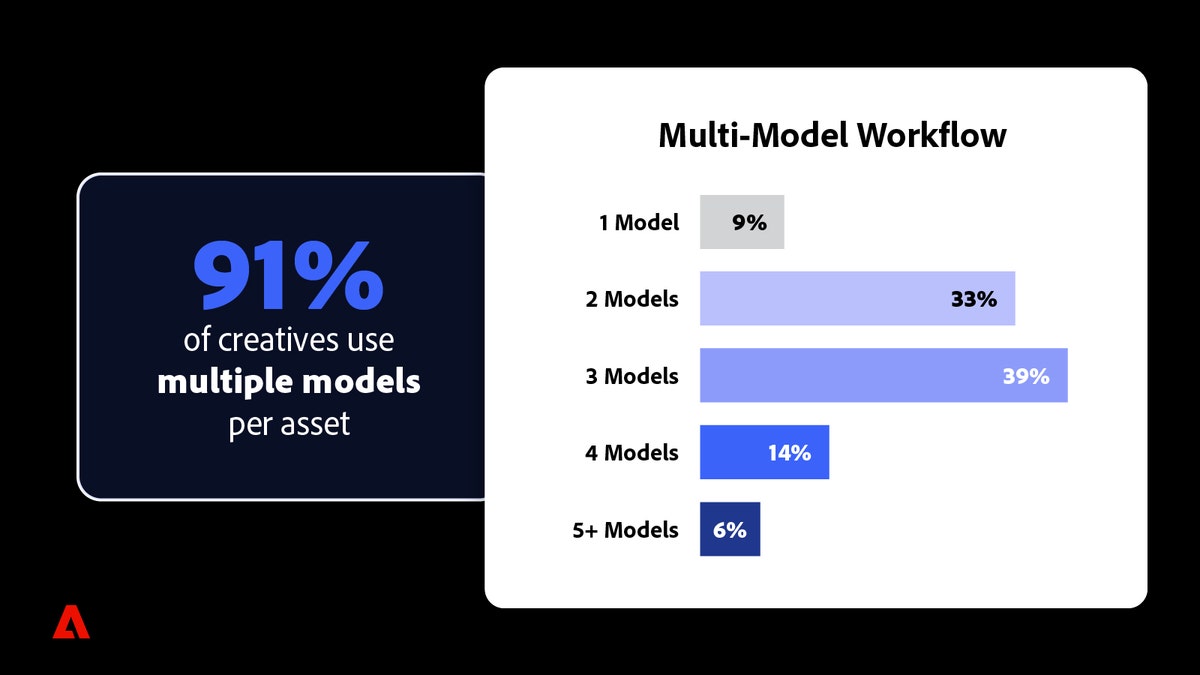
For an SMB, this raises a simple governance issue. Staff need to know which tools are approved for business content, which files can be uploaded, which assets are confidential, and which generated outputs need review before use.
That does not require a heavy policy. It does require clear rules.
A practical creative AI policy should cover:
- approved Adobe tools and company-owned accounts
- where source files, prompts, drafts, and exports are stored
- when Adobe Stock, Firefly, Express, Photoshop, or Premiere should be used
- brand colours, logos, fonts, and templates
- review steps for pricing, legal wording, regulated claims, and customer names
- how long marketing assets are retained
- who can publish to social, email, web, and print channels
The point is to let staff move faster without losing control of the business message.
Brand consistency is still the hard part
Adobe notes that creative professionals still worry about brand continuity, commercial safety, and homogenized output. Those are exactly the risks SMBs should take seriously.
AI can help generate ideas, but it does not automatically know your customer promises, tone, pricing rules, compliance obligations, or local market context. A Trinidad and Tobago business still needs its material to sound like the business, match its services, and avoid making claims it cannot support.
Good templates help. Shared asset libraries help. Clear approval ownership helps even more.
How Blue Chip can help
Blue Chip Technologies can help businesses turn Adobe creative AI tools into a supportable content workflow instead of a collection of disconnected apps.
That can include:
- Adobe Creative Cloud, Firefly, Express, Photoshop, Acrobat, and Premiere licensing guidance
- company-owned account setup and access management
- OneDrive, SharePoint, Google Drive, or Synology storage structures for creative assets
- brand asset folder organisation
- backup and endpoint protection for creative devices
- approval workflow planning for customer-facing content
- staff onboarding for file handling and publishing rules
- support for moving work between mobile, browser, and desktop Adobe tools
The goal is not to slow the team down. The goal is to make faster content production reliable enough for daily business use.
Bottom line
Creative AI can help small teams meet the rising demand for content. Adobe's research shows that professionals are already using it heavily and seeing productivity gains.
For SMBs, the next step is management. The businesses that benefit most will be the ones that pair Adobe's creative tools with company-owned accounts, organized storage, brand rules, approval workflows, and proper support.
Source: Adobe Blog - Creatives say AI is helping them meet growing demand for content and improving their work.


