Google Workspace now offers a simplified setup for Client-side encryption (CSE) that lets admins configure end-to-end encryption in minutes instead of hours. Where you previously needed deep technical knowledge to connect third-party key services and configure identity providers, the new setup path in the Admin console automates most of the heavy lifting by combining Cloud HSM Keys with Google Identity.
What actually changed with CSE setup?
The old way of setting up Client-side encryption was, frankly, a bit of a headache. You needed to configure a third-party key management service, set up an external identity provider, and navigate through multiple technical steps that often required specialist help.
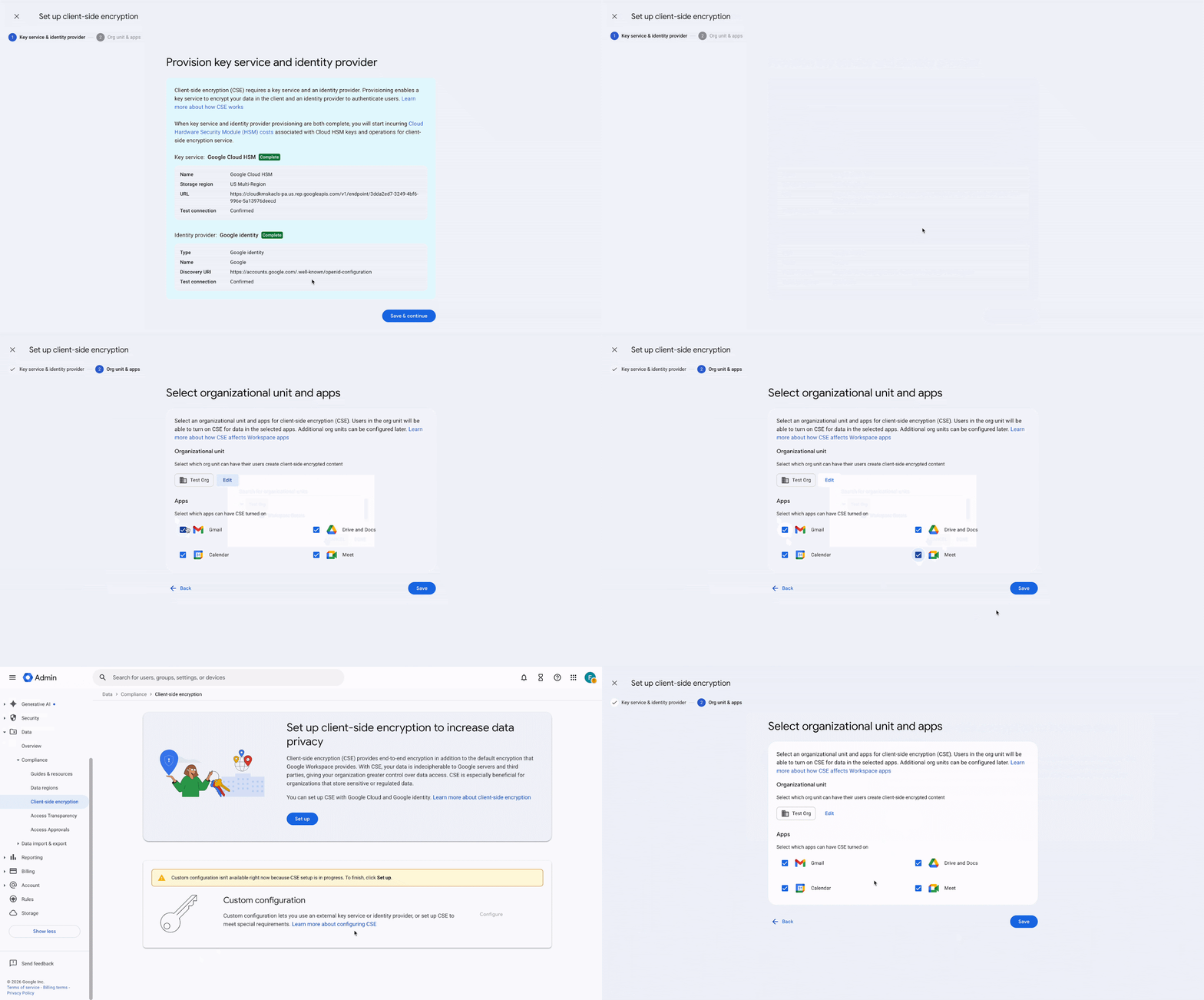
The new simplified method cuts through that. In a few clicks within the Admin console, you can:
- Enable CSE using Google's Cloud HSM (Hardware Security Module) for key management
- Use your existing Google Identity instead of configuring a separate identity provider
- Deploy encryption across your organisation using your current GCP resources
Why would my business need Client-side encryption?
CSE encrypts your data with keys your organisation controls before it reaches Google's servers. That's a meaningful distinction. Google can't read your encrypted content—only your organisation holds the keys.
This matters if you're dealing with:
- Regulatory compliance – HIPAA, ITAR, and various data sovereignty requirements often mandate this level of control
- Sensitive client data – Law firms, healthcare providers, and financial services handling confidential information
- Intellectual property – Product designs, strategic plans, or proprietary research you need to protect
CSE works across Gmail, Drive, Docs, Sheets, Slides, Meet, and Calendar. So your encrypted email attachments, video meetings, and shared documents all fall under the same protection.
Do I still need the complex setup option?
Yes, it's still there. If your organisation requires a third-party key management service—perhaps for specific compliance reasons or because you already have an established key infrastructure—you can still use the standard CSE setup process.
The simplified method suits most organisations. The traditional method exists for those with specific requirements around key management vendors.
What licences do I need?
This feature requires:
- Google Workspace Enterprise Plus
- Assured Controls or Assured Controls Plus add-on
It's not available on lower-tier Workspace plans. If you're unsure what your current licence covers, we can help you check—this is the sort of thing we clarify regularly when helping organisations choose the right Google Workspace setup.
Frequently asked questions
Does simplified CSE setup work for small businesses?
Yes, provided you have the required Enterprise Plus licence with Assured Controls. The setup process itself is designed to be accessible regardless of organisation size.
Will my end users need to do anything differently?
No. The setup is entirely admin-side. Once configured, users interact with encrypted content through their normal Workspace apps.
Can I switch from simplified setup to the third-party key service method later?
Yes, Google maintains both options. You can reconfigure your CSE setup if your requirements change.
Is my data encrypted at rest anyway without CSE?
Google encrypts all Workspace data at rest by default. CSE adds an additional layer where you control the encryption keys, meaning Google cannot decrypt your content.
Ready to set up Client-side encryption?
If you're considering CSE for your organisation—or just want to understand whether it fits your compliance requirements—Blue Chip Technologies Ltd. can walk you through the options. We help businesses worldwide configure and manage Google Workspace, with remote support available globally.
Get in touch:
- Phone: 1 (868) 609-2288
- WhatsApp: Message us directly
- Email: [email protected]
- Contact form: bluechiptt.com/contact