

Microsoft 365 Copilot Model Choice Needs a Workflow Plan
Microsoft 365 Copilot is no longer just a single AI chat box. Microsoft has been adding model choice to Copilot and Copilot Studio, including options designed for faster everyday responses and stronger reasoning for more complex work. The Microsoft 365 Blog article originally announced GPT-5.2 in Copilot, and Microsoft later updated it to note that newer ChatGPT-5.3 Instant and ChatGPT-5.4 Thinking options are also available.
For small and mid-sized businesses in Trinidad and Tobago, the useful lesson is not the model name. The practical point is that staff will increasingly choose different AI modes for different types of work. That choice needs guidance, because the wrong model for the task can waste time, increase cost, or create overconfident output.
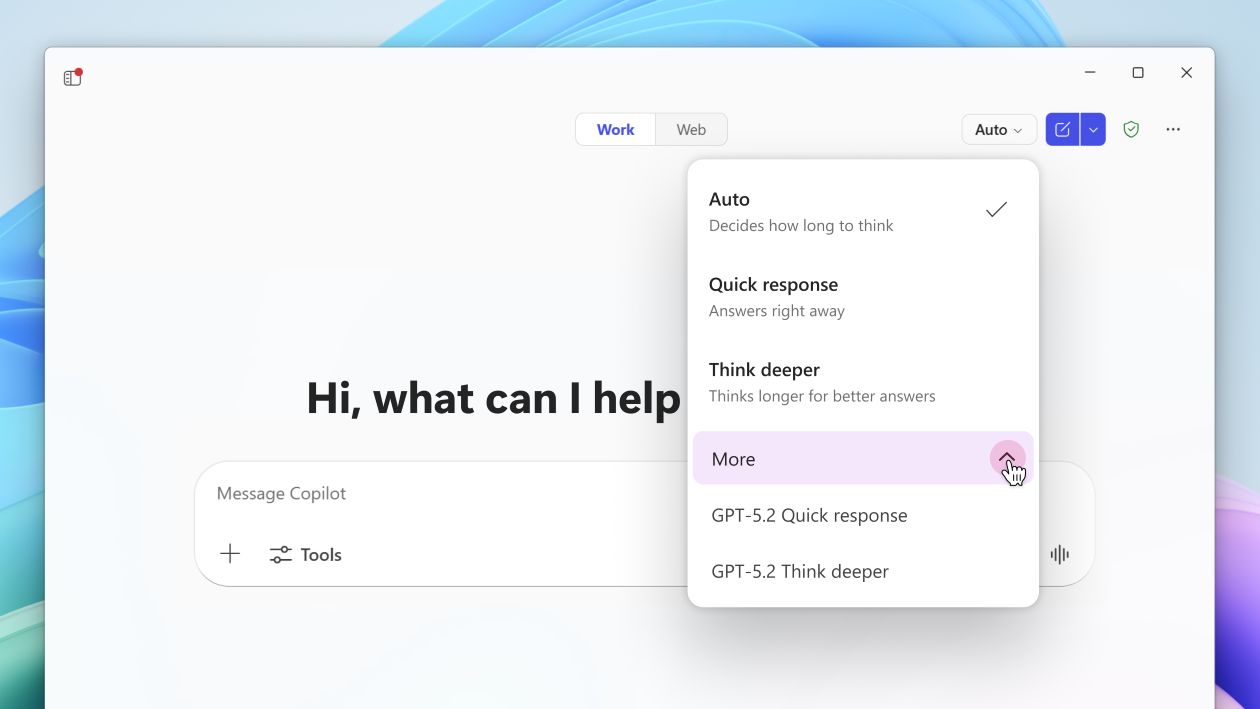
Faster Is Not Always Better
Some work needs speed. A staff member drafting a polite customer update, translating a short paragraph, summarising a simple email thread, or improving a routine document usually benefits from the faster option. The goal is a useful first draft that a person can review quickly.
Other work needs deeper reasoning. A manager comparing sales trends, preparing a board update, analysing meeting decisions against project milestones, or designing a customer service workflow may need a more capable model that can reason across more context.
That is where model choice becomes a business workflow issue, not just a feature announcement.
Where SMBs Can Use This Safely
Good first use cases are practical and low-risk:
- turning meeting notes into action items
- drafting internal announcements and customer updates
- summarising long email threads before a reply
- preparing first drafts of procedures or policies
- comparing figures in Excel before a management meeting
- creating a PowerPoint outline from approved talking points
- testing Copilot Studio agent instructions before publishing
These tasks save time without handing final judgment to AI. Staff still need to review facts, tone, numbers, customer names, and commitments before anything is sent or used.
Create Simple Rules Before Staff Guess
Businesses should not leave every user to decide blindly which AI mode to use. A short internal guide is enough to start:
- use the faster model for routine writing, summarising, and rewriting
- use deeper reasoning for analysis, planning, strategy, and multi-step decisions
- never paste passwords, MFA codes, customer secrets, payroll records, or private legal details into prompts
- ask Copilot to show assumptions when analysing business information
- check source files and numbers before relying on a result
- keep customer-facing output under human approval
This kind of guidance reduces confusion and makes Copilot feel like part of the normal Microsoft 365 workflow.
Copilot Studio Needs Extra Discipline
The same model-choice idea applies to Copilot Studio agents. An agent that answers basic HR policy questions does not need the same behaviour as an agent helping a manager reason through exceptions, approvals, or service cases.
Before publishing an agent, decide what it is allowed to do, what information it can use, who owns the workflow, and when a human must approve the next step. Model upgrades can make agents more useful, but they do not remove the need for permissions, testing, and monitoring.
Blue Chip's Practical Recommendation
Blue Chip Technologies would treat Copilot model choice as part of Microsoft 365 readiness. That means reviewing licensing, SharePoint and OneDrive permissions, Teams structure, data handling rules, and staff training before expanding usage.
Start with a small pilot:
- one department
- two or three approved workflows
- a simple prompt guide
- a clear review process
- feedback after two weeks
If the pilot reduces time spent on writing, summarising, and preparing management material without creating data-risk issues, expand gradually.
Microsoft 365 Copilot model choice can help teams work faster and think through more complex information. The businesses that benefit most will be the ones that match the AI mode to the task, keep human review in place, and build simple rules staff can actually follow.
Source: Microsoft 365 Blog - Available today: GPT-5.2 in Microsoft 365 Copilot.


