UniFi Site Manager: A Simpler Way to Manage Multiple Business Locations
For businesses with one office, managing the network is usually straightforward. But once you add branches, warehouses, retail locations, remote offices, or multiple tenants, things can become harder to control.
Different sites may have different settings. User access may be handled inconsistently. Troubleshooting can take longer because the IT team has to jump between locations, dashboards, and devices.
Ubiquiti's new UniFi Site Manager is designed to solve that problem by bringing multiple UniFi sites together into one connected management experience.
For Blue Chip customers, this matters because many businesses in Trinidad & Tobago are no longer operating from a single location. Whether it is a retail chain, professional office, school, warehouse, hospitality business, or growing enterprise, the network now has to be easier to manage, more secure, and ready to scale.
One View Across Every Site
UniFi Site Manager allows multiple UniFi sites to be managed as one wider environment. Instead of treating each location as a separate island, IT teams can get a central view of users, devices, policies, and network health.
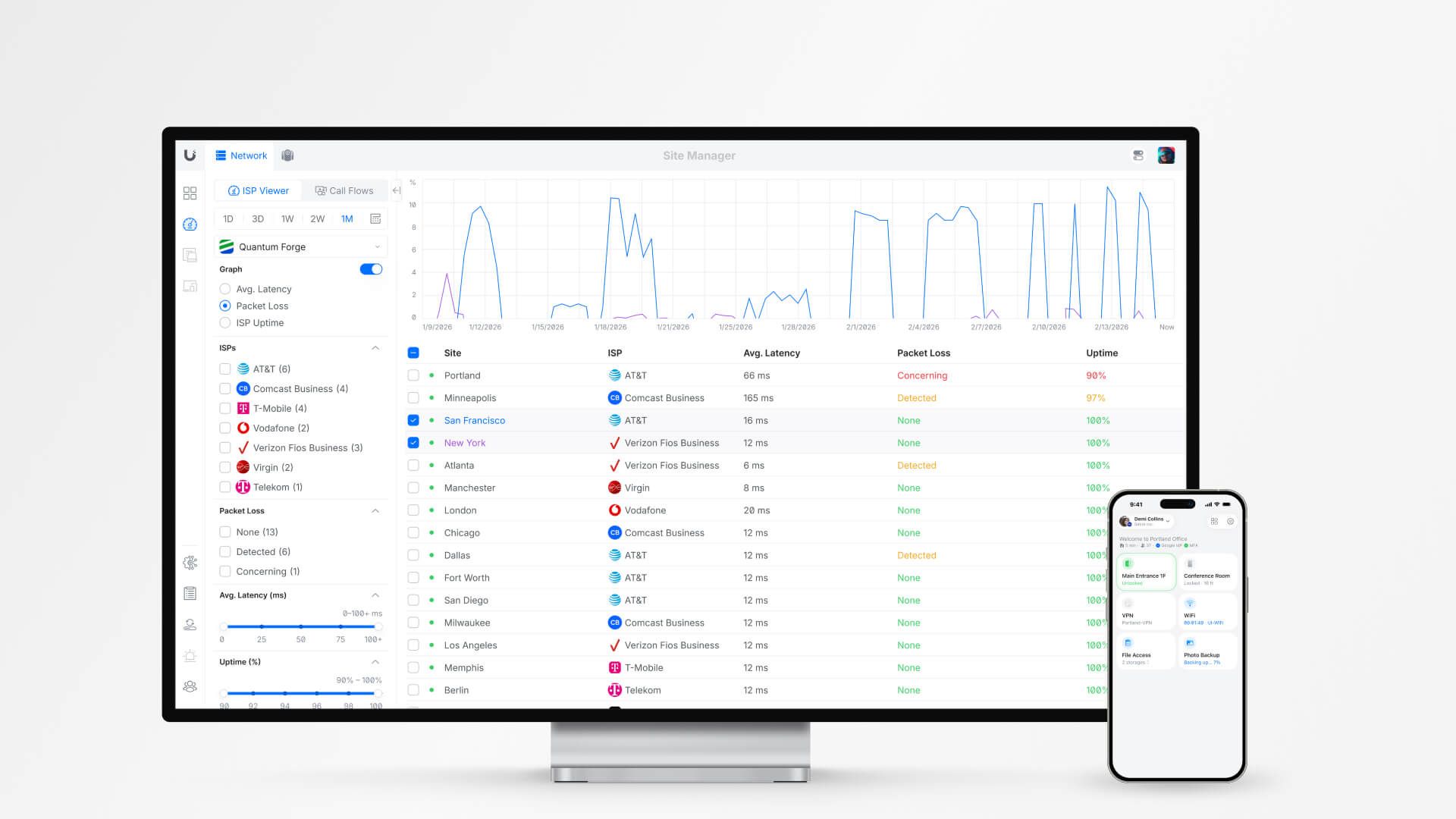
That visibility is useful when something goes wrong. If a branch is offline, a device is misbehaving, or a user is having trouble connecting, the team can respond faster because the information is easier to find.
It also helps with day-to-day operations. Management can see the bigger picture, while technical teams still have the detail they need to support each site properly.
More Consistent Network Policies
One of the biggest risks in multi-location environments is inconsistency.
A firewall rule may be correct in one branch but missing in another. Wi-Fi settings may differ between offices. User permissions may grow over time without anyone reviewing them properly.
Site Manager helps reduce that risk by making it easier to apply consistent configuration and policy across multiple locations. For businesses that need standard guest Wi-Fi, secure staff access, VLAN separation, or branch-wide security rules, this can make management cleaner and less error-prone.
Better Access Control for Teams
As businesses grow, not everyone should have the same level of access to the network.
A technician may need access to troubleshoot Wi-Fi at one branch. A manager may need visibility into reports. A senior administrator may need full control across all sites.
UniFi Site Manager supports more granular role-based management, helping businesses give people the access they need without handing over more control than necessary.
That is especially important for companies working with internal IT teams, external providers, or multiple departments.
Built for Modern Security
Network management is increasingly tied to identity. It is no longer enough to know that a device connected; businesses also need to understand who is connecting, what they are allowed to access, and whether that access should be trusted.
UniFi's direction with Site Manager includes support for identity provider integration and Zero Trust-style access controls. In practical terms, this helps businesses move toward more secure access models where users and permissions are managed more intentionally.
For organizations handling sensitive customer data, finance systems, point-of-sale platforms, or internal applications, this is a useful step toward stronger control.
Scales Without Extra Licensing Complexity
A major advantage of UniFi has always been its license-free management model. Site Manager continues that approach by giving businesses more enterprise-style oversight without introducing the kind of recurring licensing burden often found in other platforms.
That does not mean every environment is simple. Larger networks still need proper design, documentation, backups, monitoring, and support. But for many growing businesses, UniFi can provide a strong balance of capability and cost control.
Why This Matters for Local Businesses
For a business with multiple sites, the network is part of daily operations. If Wi-Fi is unreliable, if the VPN fails, if a branch loses visibility, or if access is not managed properly, productivity suffers.
UniFi Site Manager is useful because it addresses common operational problems:
- Central visibility across locations
- Easier troubleshooting
- More consistent security policies
- Better control over users and roles
- Reduced complexity for growing networks
- Scalable management without per-device licensing surprises
For businesses planning expansion, this also makes future sites easier to bring online. A new branch can follow the same standards instead of being built from scratch every time.
How Blue Chip Can Help
Blue Chip Technologies works with businesses that need practical, maintainable IT systems — not overcomplicated solutions that become difficult to support.
For UniFi environments, that includes network design, site planning, firewall and VLAN configuration, Wi-Fi optimization, remote access, monitoring, documentation, and ongoing support.
If your business is running multiple locations, or planning to expand, UniFi Site Manager may be a good fit for simplifying network operations while improving visibility and control.
Source: Ubiquiti — The New Site Manager - Now Official, published 20 April 2026.