

Adobe AI Tools Need Governance Before They Hit Daily Work
Adobe is putting AI into more of the tools businesses already use: Acrobat AI Assistant, PDF Spaces, Express AI Assistant, Firefly image and video models, Photoshop AI Assistant, Lightroom AI Edits, and Stock AI Studio.
That is useful for small businesses in Trinidad and Tobago. It can help staff summarise documents, prepare content faster, clean up images, create campaign drafts, and reduce repetitive creative work.
But AI features should not be treated like a casual add-on. Adobe recently expanded its bug bounty program to encourage more AI security research across its product portfolio. The announcement is a useful reminder for SMBs: if AI is becoming part of daily work, the business needs rules, account control, and support around how those tools are used.
Adobe is widening AI security research
Adobe says its expanded scope covers newly released AI features across web applications, including Acrobat AI Assistant, Acrobat PDF Spaces, Acrobat Create Presentations, Acrobat Create Podcast, Express AI Assistant, Firefly Image Models, Firefly Video Model, Firefly Custom Models, Lightroom AI Edits, Lightroom edit suggestions, Photoshop AI Assistant, and Stock AI Studio.
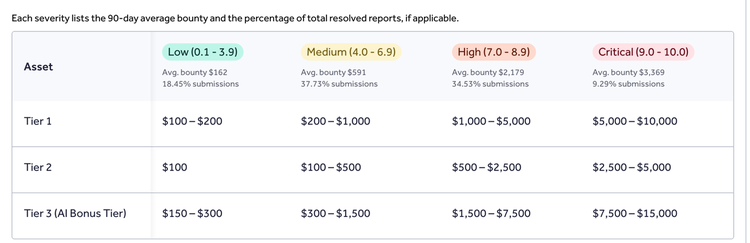
The company also introduced a dedicated AI bonus tier for qualifying AI-related findings, with higher rewards for critical vulnerabilities in scoped AI assets.
That matters because AI tools change the way information moves. A document assistant may read sensitive PDFs. A creative assistant may receive campaign assets. A generative image tool may create customer-facing material. A stock or marketing workflow may touch brand files, product details, and draft copy.
For a business, the point is not panic. The point is governance.
SMBs should decide what AI tools can touch
Many teams start using AI before they define boundaries. A staff member pastes a contract into a chat, uploads a proposal for summarisation, asks a design assistant to create a campaign visual, or uses a document tool to prepare a customer-ready file.
Those workflows may be legitimate, but they should not be unmanaged.
Before rolling out Adobe AI features, a business should decide:
- which staff roles may use AI-powered Adobe tools
- which documents may be summarised or transformed
- which customer or employee data must not be uploaded
- where generated drafts and final files should be stored
- who approves AI-assisted marketing content before publication
- how brand assets, logos, product photos, and templates are protected
- whether AI features are enabled under company-managed accounts
- how access is removed when staff leave
- what support path staff should use when something looks wrong
These decisions are easier to make before the tools become part of daily habits.
Acrobat AI features need document rules
Acrobat AI Assistant and PDF Spaces can be useful for teams that handle policies, proposals, contracts, manuals, lease documents, invoices, and meeting material. Staff can ask questions about documents, summarise information, and prepare outputs faster.
The business still needs document rules.
Sensitive files should live in approved storage such as Microsoft 365, SharePoint, Google Workspace, Synology, a CRM, or another managed document location. Staff should understand when a PDF can be processed with AI, when it should stay internal, and when it should be handled through a more controlled workflow.
For example, a public brochure and a customer ID document are not the same risk. A vendor product sheet and an employee HR form are not the same risk. The AI workflow should reflect that difference.
Creative AI needs brand control
Adobe Firefly, Express AI Assistant, Photoshop AI Assistant, Lightroom AI Edits, and Stock AI Studio can help businesses create and refine visual content faster.
That speed is valuable for everyday marketing:
- social media graphics
- event promotions
- product images
- recruitment posts
- customer notices
- website banners
- internal presentations
- proposal visuals
- campaign variations
But speed can create inconsistency if staff are working from personal accounts, scattered files, old logos, or unapproved templates.
Blue Chip recommends keeping brand assets in a company-controlled location, assigning Adobe licences to business-managed users, and making sure final creative files are saved where the company can find and back them up later.
Security is not only Adobe's job
Adobe's bug bounty expansion shows that vendors are investing in AI security. That is important, but it does not remove the customer's responsibility.
Every business still needs basic controls:
- strong account security and MFA
- approved business accounts instead of personal tool use
- endpoint protection on devices that handle documents and creative files
- role-based access to sensitive folders
- backup for important PDFs, project files, and campaign assets
- clear offboarding when users leave
- practical guidance on what staff can paste into AI tools
- review of AI-assisted public content before it goes live
These controls are not only for large enterprises. They are exactly the controls that keep a small business from losing files, exposing customer data, publishing inaccurate content, or depending on one person's laptop.
How Blue Chip can help
Blue Chip can help local businesses adopt Adobe AI capabilities without letting the workflow become unmanaged.
That can include:
- Adobe Acrobat, Creative Cloud, Express, Firefly, Photoshop, Lightroom, and Stock licensing guidance
- setup of company-managed Adobe users
- MFA and account security review
- document workflow planning for Acrobat AI Assistant and PDF Spaces
- secure storage planning using Microsoft 365, Google Workspace, SharePoint, Synology, or other business systems
- brand asset folder structure and permissions
- backup and recovery planning for PDFs, project files, and marketing assets
- endpoint readiness for staff using Adobe tools
- staff guidance on safe AI usage
- helpdesk support for Adobe account and application issues
The goal is straightforward: help staff use powerful tools without losing control of documents, creative assets, customer data, and company accounts.
Put the rules in place before the habits form
Adobe AI features can make everyday work faster. That is the opportunity.
The risk is letting those tools spread informally before the business has decided what good usage looks like.
If your team is already using Acrobat AI Assistant, PDF Spaces, Adobe Express, Firefly, Photoshop AI Assistant, Lightroom AI Edits, or Stock AI Studio, now is the right time to review licensing, storage, user access, backup, and AI usage rules.
Source: Adobe Security Blog - Adobe expands bug bounty program to incentivize AI security research.


