Ransomware attackers now target backups directly—a Sophos study found backup compromise attempts in 94% of ransomware incidents, with 57% succeeding. If your backups aren't isolated from your production network, they're vulnerable. Synology ActiveProtect addresses this by combining both physical and logical data isolation techniques, giving your organisation multiple layers of protection without sacrificing the ability to manage and access your backup data when you need it.
At Blue Chip Technologies Ltd., we've seen too many businesses learn this lesson the hard way. Your backups are supposed to be your safety net. When attackers can encrypt or delete them alongside your primary data, that net disappears.
Why are attackers going after backups specifically?
Think about it from the attacker's perspective. If they encrypt your servers but you've got clean backups ready to restore, their leverage evaporates. You restore, move on, and they get nothing. But if they can compromise your backups first? Now you're stuck.
That's why modern ransomware campaigns specifically hunt for backup repositories before triggering encryption. They look for network-attached storage, backup servers, cloud sync folders—anything that might help you recover without paying.
What's the difference between physical and logical isolation?
Traditional air-gapping meant literally unplugging devices or storing tape backups offsite. It works, but it's painful to manage. You need someone physically handling media, you can't verify backups remotely, and restores take ages.
Logical isolation keeps devices network-connected but uses authentication, encryption, access controls, and immutability to prevent unauthorised access. It's more practical for day-to-day operations while still providing meaningful protection.
| Approach | How it works | Trade-offs |
|---|---|---|
| Physical isolation | Devices disconnected from network entirely | Maximum security, but manual processes and no remote management |
| Logical isolation | Network-connected with access controls, encryption, immutability | Easier management, still protected via multiple security layers |
Most organisations benefit from combining both approaches—and that's exactly what ActiveProtect enables.
How does ActiveProtect protect backup data?
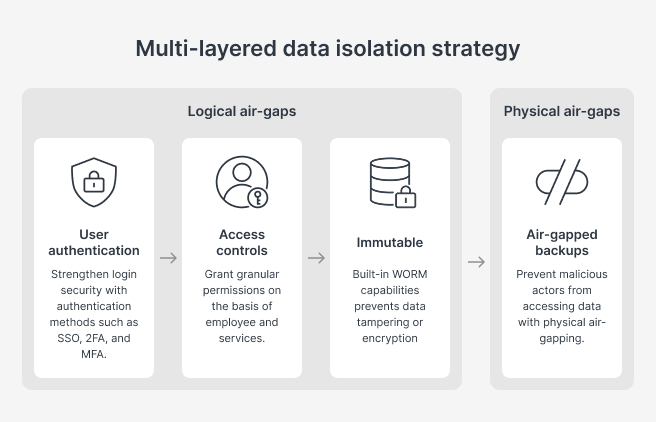
ActiveProtect provides three core defensive layers:
User authentication – Integrates with Windows AD and LDAP for centralised management. Supports SSO, two-factor authentication, and MFA to prevent unauthorised access.
Role-based access controls – Granular permissions based on job function. Your helpdesk staff don't need the same backup access as your IT manager.
Immutable backups – Write Once, Read Many (WORM) technology with version-level locking. Data can't be modified, deleted, or encrypted until the retention period expires. Even if attackers get in, they can't touch the backup data.
Can ActiveProtect automate physical isolation?
Yes—and this is where it gets interesting. Traditional physical isolation requires someone to manually disconnect devices or swap tapes. ActiveProtect automates this.
You define transmission windows for when data replicates to your offsite appliance. Outside those windows, the system shuts down the network interface entirely. The backup appliance becomes physically unreachable—no manual intervention required.
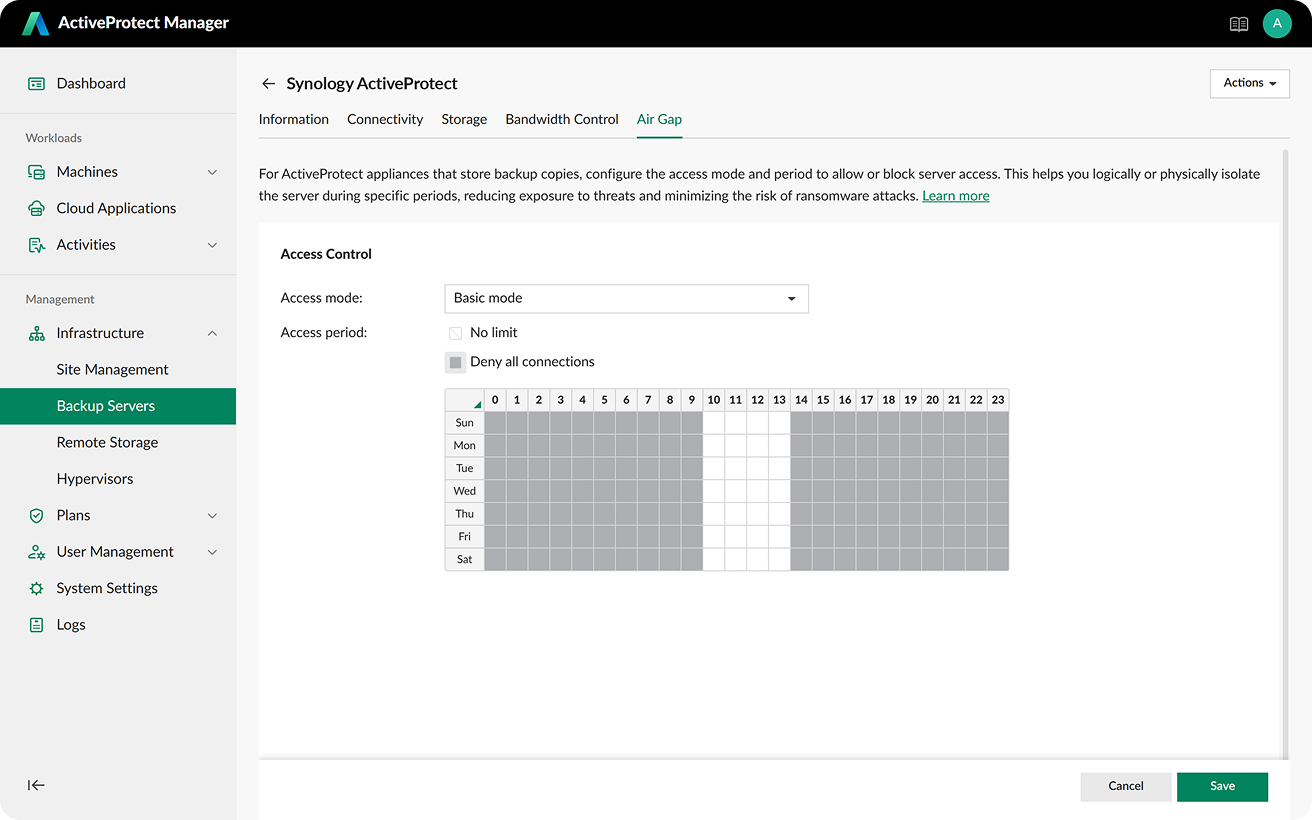
During transmission, only authorised servers can send data. Unauthorised systems simply can't connect. Once transmission completes, the appliance goes dark again.
What does this look like in practice?
Say you run a professional services firm with offices in multiple locations. Your production data lives on local servers and cloud applications. Every night, ActiveProtect backs up that data to a local appliance, then replicates to an offsite unit.
The offsite unit only accepts connections from your primary backup server, only during your defined window (maybe 2am to 4am), and only for authenticated data transfers. The rest of the time, it's unreachable. Even if attackers compromise your entire primary network, they can't touch that offsite copy.
When you need to restore, you bring the interface back up, authenticate properly, and pull your data. The immutability settings mean even a compromised admin account can't delete backup versions before their retention period expires.
For more on how backup and recovery solutions fit into your broader IT infrastructure, see our data backup and disaster recovery solutions.
Frequently asked questions
Does logical isolation provide enough protection without physical air-gapping?
Logical isolation with immutability provides strong protection for most scenarios. Physical isolation adds another layer for organisations with strict compliance requirements or high-risk profiles. ActiveProtect supports both, so you can choose based on your needs.
How long does it take to restore data from an isolated backup?
Restore times depend on data volume and network speed. Because ActiveProtect uses automated isolation rather than manual tape handling, you're not waiting for someone to physically retrieve media—restores can begin as soon as you bring the network interface back online.
Can attackers bypass immutable backups?
Immutability at the storage level means data can't be modified or deleted until the retention period expires, regardless of what credentials an attacker has. They'd need physical access to the appliance itself to circumvent this.
Does this work for cloud-based workloads?
ActiveProtect can back up SaaS applications and cloud workloads, with the same isolation protections applied to that backup data.
Let's talk about protecting your backups
If you're not confident your current backup strategy would survive a targeted attack, it's worth a conversation. Blue Chip Technologies Ltd. supplies, configures, and supports Synology ActiveProtect for businesses worldwide—remote setup and support globally, with on-site assistance available in Trinidad & Tobago.
Get in touch:
- Contact us online
- Call: 1 (868) 609-2288
- Email: [email protected]