

Microsoft Agent 365: Keep AI Helpers Visible, Governed, and Secure
AI assistants and agents are quickly moving from experiment to everyday work. They can summarize information, draft documents, organize inboxes, support customers, create reports, and connect business systems that used to require manual follow-up.
That is useful. It also creates a new management problem.
If staff can create or connect AI agents without clear visibility, the business may not know which agents exist, what data they can access, which systems they can act on, or who is responsible for them. For small and medium-sized businesses in Trinidad and Tobago, that is not just a technical issue. It affects confidentiality, compliance, productivity, customer trust, and operational control.
Microsoft's announcement that Microsoft Agent 365 is now generally available is important because it treats AI agents like something businesses must manage properly — not just another exciting tool to try.
The real issue is agent sprawl
Most businesses already struggle with app sprawl: too many subscriptions, too many logins, too many places where files and customer information can live.
AI agents can multiply even faster. One team may use an agent in Microsoft 365 Copilot. Another may test an agent connected to a helpdesk. A developer may use a local coding assistant. A department may adopt a SaaS agent that connects to email, documents, or CRM records.
Each one may be helpful on its own. Together, they can become difficult to govern unless IT has a clear inventory.
For management, the basic questions are practical:
- What agents are being used in the company?
- Who owns each agent?
- What data can each agent read?
- Can it take action, or only answer questions?
- Which identities and permissions does it use?
- Is it approved, monitored, and documented?
- What happens if it behaves unexpectedly?
Agent 365 is Microsoft's answer to those questions: a control plane to observe, govern, and secure agents across Microsoft 365 and supported partner ecosystems.
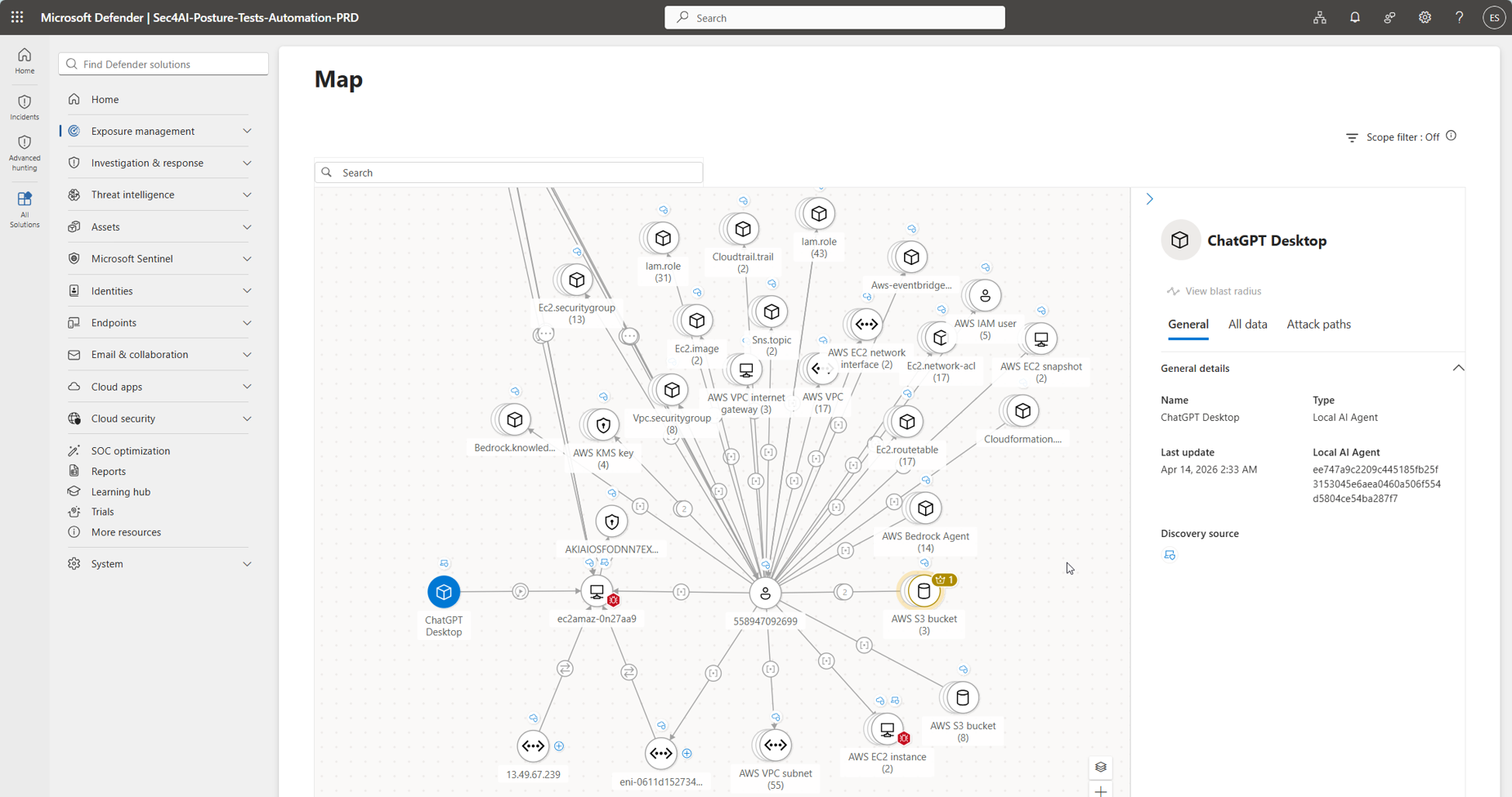
Agent 365 and Microsoft Defender are designed to help IT teams understand where agents run and what resources they can reach.
Why SMBs should care before AI gets messy
Some smaller businesses may think agent governance is an enterprise problem. That is risky.
SMBs often have lean teams, shared responsibilities, and fewer formal controls. That makes good visibility even more important. If an AI tool is connected to mailboxes, SharePoint files, Teams conversations, customer records, accounting exports, or operational documents, it needs guardrails.
A well-managed approach can help businesses use AI safely by:
- keeping an inventory of approved AI agents
- identifying shadow AI tools before they become a data risk
- limiting agents to the systems and information they actually need
- applying Microsoft Defender, Intune, and Entra controls where appropriate
- reviewing which agents operate with user-delegated access versus their own permissions
- documenting ownership, purpose, and review dates
- giving management audit-ready evidence when questions arise
This is the difference between "everyone is trying AI" and "the business has a controlled AI adoption plan."
Governance should not stop productivity
The goal is not to block every new tool. The goal is to help useful AI tools become safe, supportable, and repeatable.
For example, an agent that helps summarize project documents may save staff hours each week. A support triage agent may help a service team respond faster. A finance workflow agent may help check incoming requests before a human approves the next step.
Those are good outcomes — if permissions, data access, and accountability are clear.
Blue Chip's view is that AI adoption should follow the same discipline as any other business system: understand the process, confirm the data source, set the permissions, document the owner, test the workflow, monitor usage, and review it regularly.
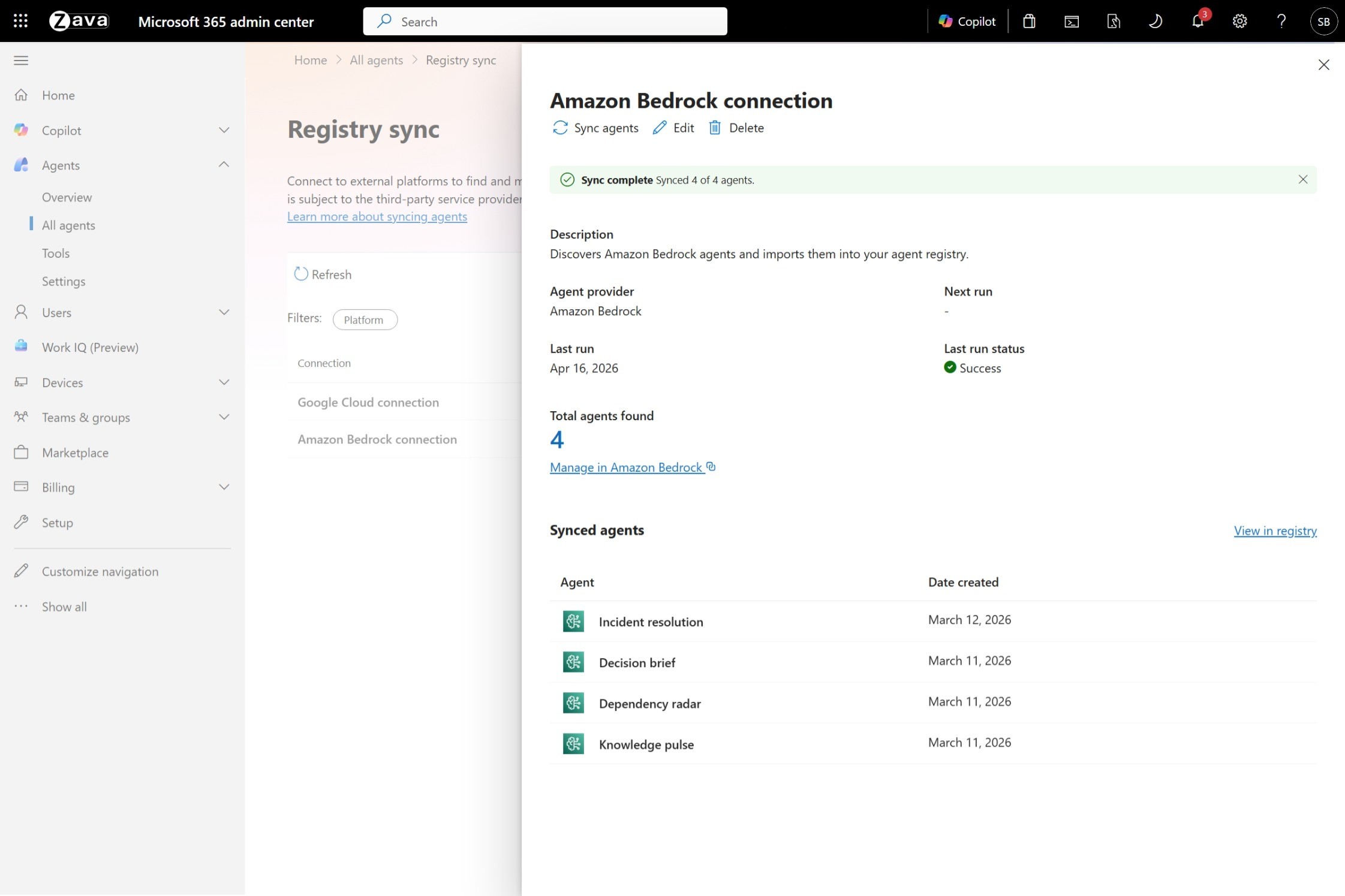
Agent registry sync gives administrators one place to inventory agents across Microsoft and selected third-party platforms.
Where Microsoft 365 fits
Microsoft Agent 365 connects naturally with the wider Microsoft 365 environment many businesses already use: Teams, SharePoint, OneDrive, Outlook, Microsoft 365 Copilot, Defender, Intune, Entra, and Windows 365.
That matters because the strongest AI governance usually comes from using tools that already understand identity, device management, endpoint security, and data protection.
A business does not need ten disconnected dashboards just to answer whether an agent can reach sensitive documents. The better model is centralized visibility tied to existing Microsoft 365 administration and security controls.
A practical starting checklist
Before rolling AI agents into daily operations, Blue Chip recommends that SMBs start with a simple governance checklist:
- list the AI assistants and agents currently being used
- identify which ones touch company data
- confirm whether they are approved for business use
- review Microsoft 365, SharePoint, Teams, and mailbox permissions
- ensure MFA and conditional access are in place for key users
- use Intune and Defender where available for endpoint visibility
- create an internal process for approving new agents
- assign an owner for every production workflow
- review logs, permissions, and business value on a schedule
This does not have to slow the business down. It helps AI move from scattered experiments into managed productivity.
Blue Chip can help make AI adoption safer
AI agents can be a real advantage for local businesses, especially where teams are stretched and repetitive work slows down service. But the more useful an agent becomes, the more important it is to know what it can access and what it can do.
Blue Chip helps clients review Microsoft 365 environments, clean up permissions, strengthen endpoint and identity controls, and plan practical AI workflows that fit the way the business actually operates.
The goal is straightforward: use AI to improve work without losing control of data, security, or accountability.
Source: Microsoft 365 Blog — Microsoft Agent 365, now generally available, expands capabilities and integrations.


