Why Your Microsoft Teams Backup May Be Leaving Critical Conversations Behind
If your business runs on Microsoft 365, Teams is probably where approvals happen, HR issues get discussed, customer decisions are recorded, and files are shared every day. For clinics, distributors, retailers, contractors, and professional services firms across Trinidad and Tobago, that chat history is not casual conversation. It is business evidence.
The problem is that not every backup solution treats it that way.
The Channel vs. Chat Blind Spot
Most organisations know they should back up Teams data. What they do not always realise is that "Teams data" covers two very different things.
Public channels are the structured workspaces where departments or projects collaborate. They are relatively straightforward to back up because the data sits in one place.
Private chats are different. These are the one-to-one and small-group conversations where sensitive decisions actually get made. Finance approvals. Staffing conversations. Pricing negotiations with suppliers. Customer complaints handled in real time.
Some backup tools cover channels well but do not fully support private chat backup. If your recovery plan only restores channel posts, you are missing the conversations that often matter most in a dispute, audit, or compliance review.
Why Private Chat Backup Is Harder Than It Looks
Private chats are not stored the way channels are. Each participant's copy of a conversation lives in their own personal Exchange mailbox. That means a single chat thread is fragmented across multiple mailboxes.
To restore a complete conversation, a backup system has to collect those separate pieces and reconstruct the thread accurately. That is technically complex, which is why some vendors skip it or deliver incomplete results.
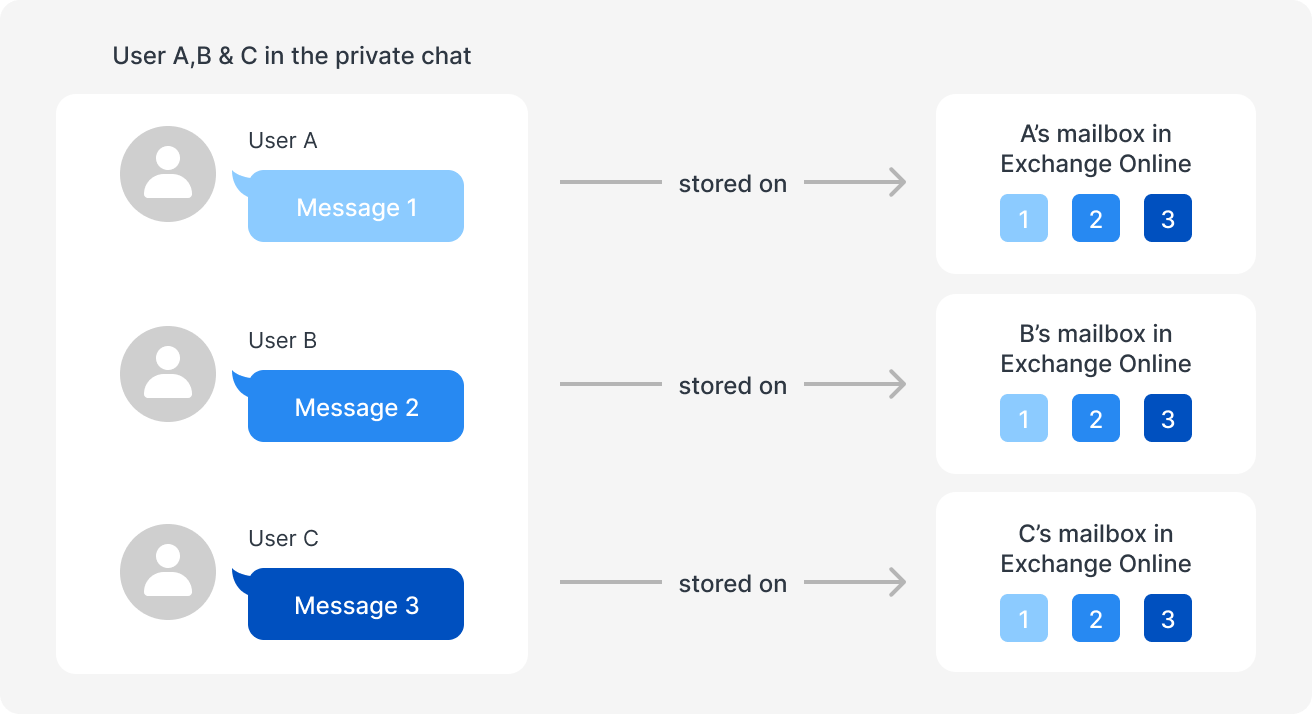
Private Teams chat backup is different from channel backup because conversation data can be split across participant mailboxes.
Full-Fidelity Means More Than Plain Text
Even when chats are backed up, the quality of that backup varies. A useful recovery should preserve more than the words on the screen.
Think about what is actually in your Teams conversations. Formatting that clarifies meaning. Embedded tables with numbers. Stickers or reactions that show intent. OneDrive links to contracts, invoices, or project files. Attachments that were shared directly in the chat.
If your backup only stores plain text, you lose context. A restored conversation without its attachments, formatting, or working file links is not a reliable record. It is a summary, and summaries do not hold up in audits or disputes.
There is also a technical trap with attachments. The Microsoft Graph API, which many backup tools rely on, can return attachment URLs rather than the files themselves. If the original file moves or gets deleted later, that link becomes a dead end. Your backup looks complete, but the attachment is gone.
What Happens When Recovery Actually Matters
The real test of a backup is not the daily success email. It is what you can produce when something goes wrong.
A deleted chat that contained a customer agreement. A compromised account where you need to prove what was said. A ransomware incident where you must reconstruct decisions quickly. An auditor who asks for messages from a specific date range, formatted and timestamped, with attachments intact.
If your backup cannot search across chats, filter by date, show you a preview before restoring, or export messages as HTML with timestamps, you are working blind. You may find the data exists but cannot get it into a usable form fast enough.
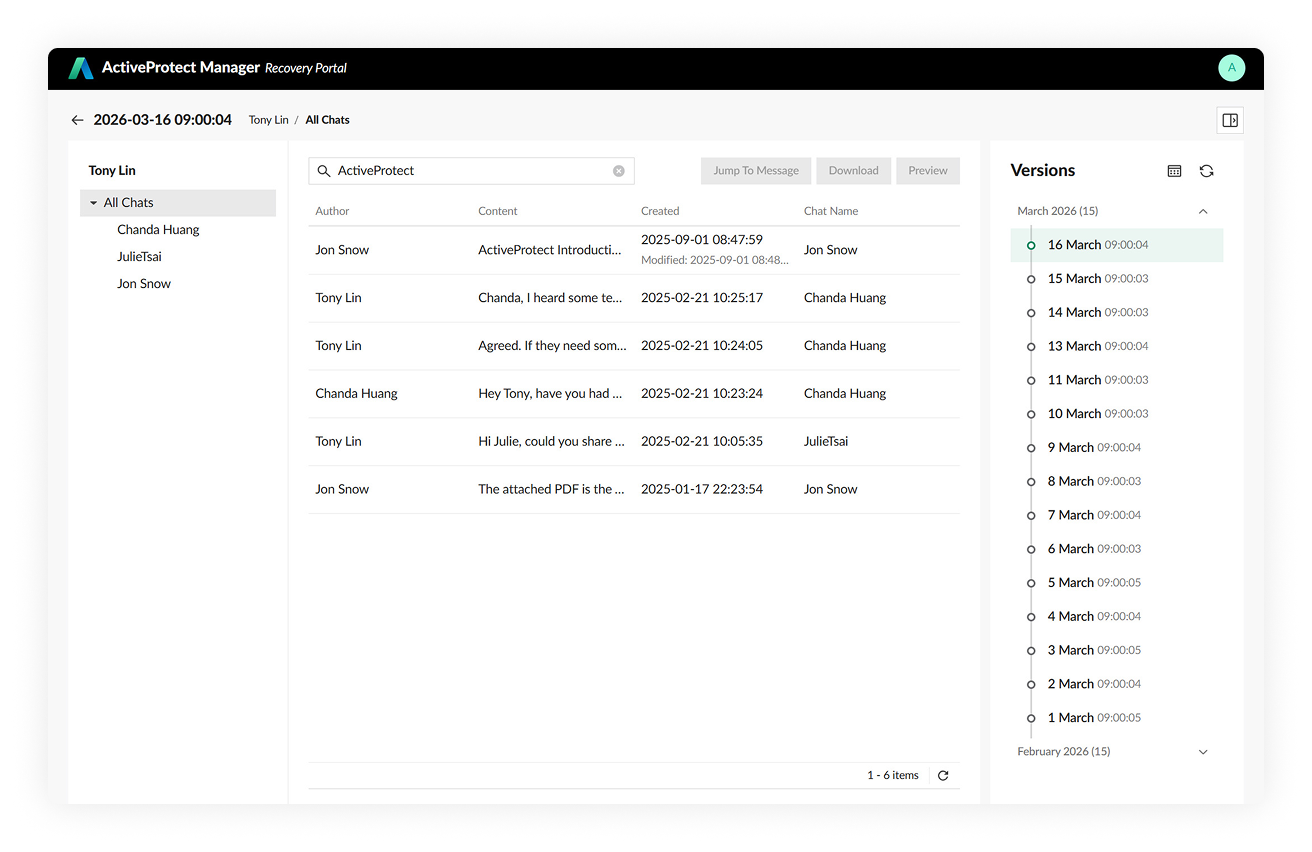
Search, preview, and export visibility matters when Teams data must be recovered for an audit, investigation, or incident response.
What to Look For in Teams Backup Coverage
You do not need to become a backup engineer. But you should ask your IT provider or internal team a few direct questions about your Microsoft 365 recovery plan:
- Does our backup include private 1:1 and group chats, or only public channels?
- Are attachments downloaded and stored with the conversation, or just linked?
- Is message formatting, including tables and embedded links, preserved?
- Can we search chats and filter by date range during recovery?
- Can selected messages or full chats be exported as readable, timestamped files?
- If one message fails to back up, does the entire job stop, or does it continue and retry?
- How would we restore a conversation if an account is deleted or compromised?
These are not technical niceties. They determine whether your backup is a real safety net or a false sense of security.
A Practical Approach for SMBs
For most small and medium businesses in Trinidad and Tobago, the right approach is not to chase a single product as a cure-all. It is to treat Microsoft 365 backup as a managed process that matches your actual risks.
That means understanding where your critical decisions live. It means verifying that your backup covers both channels and private chats with full fidelity, not just text summaries. It means testing whether you can actually find and restore what you need, in a format you can use, under pressure.
Some solutions, including Synology ActiveProtect, address these specific gaps by proactively downloading attachments, deduplicating group chat data across participants, supporting search and date filtering, allowing previews before restore, exporting conversations as HTML with timestamps, and using retry handling so one failed message does not derail the entire backup job. Whether that fits your environment depends on your setup, your budget, and your recovery requirements. The point is to evaluate against real business needs, not just check a box that says "Teams backup enabled."
Review Your Coverage Before You Need It
If you are unsure what your current Microsoft 365 backup actually recovers, now is the time to find out. Do not wait for a deleted chat, a compliance request, or a security incident to reveal the gap.
Blue Chip Technologies works with Trinidad and Tobago businesses to review Microsoft 365 and Teams backup coverage, identify what is actually being protected, and close the gaps that create real business risk. Contact us to schedule a review.
Source attribution: This article references information from Synology's blog post "Not all Microsoft Teams backups are the same: what vendors don't tell you," published March 17, 2026. Read the original here.