

Shadow AI Agents Need Inventory Before They Touch Business Data
Microsoft has made Agent 365 generally available, and the message behind the announcement is practical for every small and mid-sized business using Microsoft 365: AI agents need to be treated like part of the IT estate, not like harmless side tools.
That matters because agents can now sit inside Microsoft 365 Copilot, Teams, Copilot Studio, SaaS platforms, developer tools, endpoint devices, and cloud services. Some help a user draft or summarize work. Others may run with their own permissions, connect to business systems, trigger actions, or handle sensitive files.
For businesses in Trinidad and Tobago, the risk is not only "AI wrote a bad answer." The bigger risk is that an unmanaged agent gets access to customer records, finance files, HR information, or operational systems without anyone knowing who owns it.
AI agents need an asset register
Most businesses already understand that laptops, users, mailboxes, servers, and applications need inventory. AI agents should be added to that same thinking.
Before an agent becomes part of daily work, the company should know:
- what the agent is called
- who requested it
- who owns the business process
- where it runs
- which users can access it
- what data it can read
- what actions it can perform
- which systems it connects to
- how activity is logged
- when it should be reviewed or retired
Without that inventory, AI becomes another form of shadow IT. Staff may adopt useful tools with good intentions, but the business loses visibility into access, data movement, and accountability.
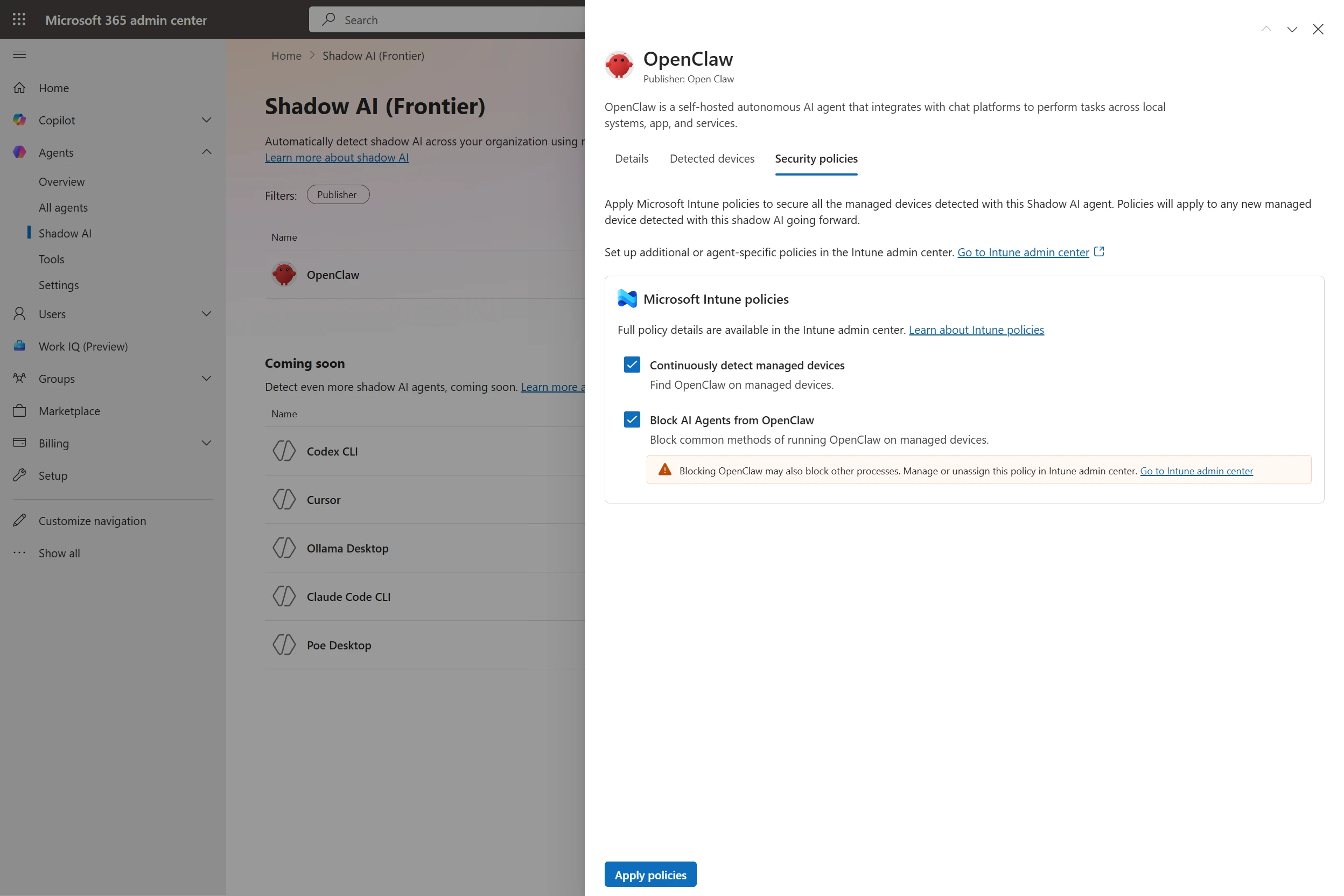
Microsoft's Agent 365 update shows the direction of travel: AI agents need inventory, ownership, and policy controls before they become part of daily operations.
Local agents change the endpoint conversation
Microsoft's update specifically talks about discovering and managing local AI agents on Windows devices through Agent 365, Microsoft Defender, and Intune. That is important because modern AI tooling is no longer limited to a web chat window.
A local agent can interact with files, code, browsers, terminals, internal tools, and cloud services from the user's device. That can be powerful for developers, analysts, administrators, and power users. It also means endpoint management matters more.
An SMB should ask:
- Are company laptops managed?
- Are local admin rights controlled?
- Is Defender active and monitored?
- Are device compliance policies enforced?
- Can IT see risky software or unmanaged AI tools?
- Are staff allowed to connect AI tools to company data?
If the answer is unclear, the business should clean up endpoint management before allowing agents to handle sensitive workflows.
Permissions should follow least privilege
An agent should not inherit broad access simply because it is convenient. The same least-privilege principle used for staff accounts, service accounts, and applications applies here.
For example, an agent that helps triage customer service requests may need access to a mailbox, a Teams channel, and a ticket list. It probably does not need access to payroll folders, accounting exports, or every SharePoint site in the company.
Before expanding an agent, Blue Chip would recommend checking:
- whether the agent uses delegated user access or its own credentials
- whether access is limited to the workflow it supports
- whether actions are logged under a clear identity
- whether human approval is required for customer-facing or financial actions
- whether permissions are reviewed after the pilot
This keeps useful automation from becoming a quiet data exposure problem.
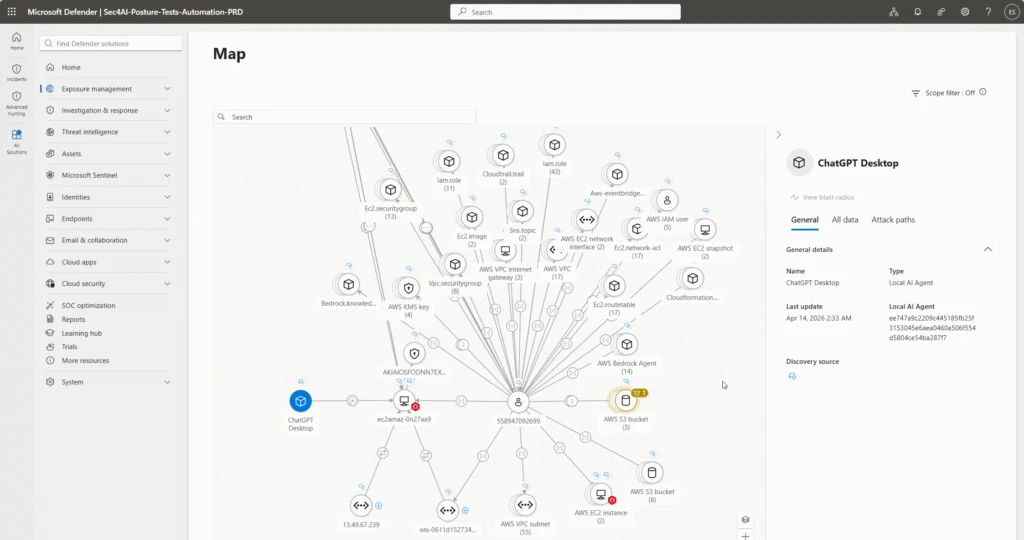
Defender-style relationship views are useful because risk depends on where the agent runs, which identity it uses, and what systems it can reach.
Connected apps make governance more urgent
Agent 365 is also expanding across Microsoft and partner ecosystems. That is useful because real work rarely lives in one place. A business may use Microsoft 365 for email and files, a CRM for customers, accounting software for invoices, a helpdesk for support, and cloud tools for reporting.
The more agents connect across those systems, the more important governance becomes.
Before connecting an agent to a SaaS app or cloud service, the company should confirm:
- the app is approved for business use
- the connector respects existing access controls
- data movement is understood
- logs are available for review
- vendor risk is acceptable
- the agent has a named business owner
- there is a rollback plan if the workflow behaves incorrectly
This is especially important for smaller teams, where one integration can quickly touch sales, support, finance, and operations.
Security teams need context, not just alerts
Microsoft describes Defender relationship mapping for agents, identities, MCP servers, devices, and cloud resources. The practical lesson is that an alert is not enough by itself. IT needs context.
If an agent behaves strangely, the business needs to know:
- which device it ran on
- which user or identity it used
- which files it accessed
- which network destinations it contacted
- which business systems it could reach
- whether sensitive data was involved
That context helps decide whether an event is low risk, a misconfiguration, or a real incident.
The first policy can be simple
SMBs do not need a huge AI governance manual to start. They need a clear first policy that staff can follow.
A practical AI agent policy should say:
- approved tools must be registered with IT
- company data cannot be connected to unapproved agents
- agents that act on business systems need an owner
- customer, HR, finance, and legal data require extra review
- external actions need a human approval step
- IT can block unmanaged agents on company devices
- agents are reviewed regularly and removed when no longer needed
The policy should support good work, not punish experimentation. The goal is to make safe adoption easier than risky improvisation.
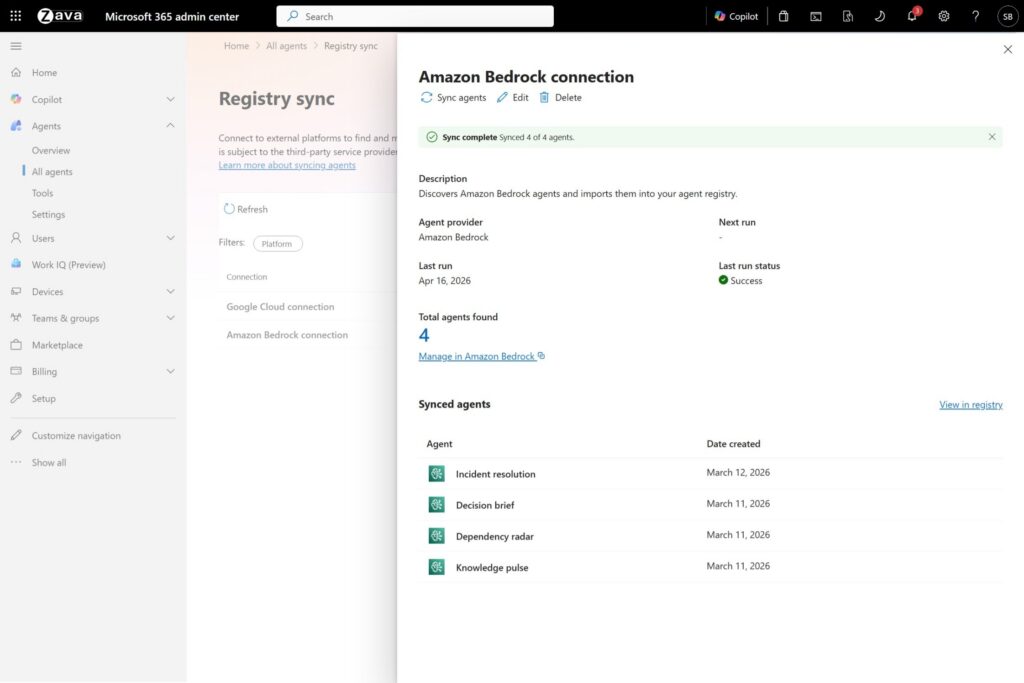
Agent inventory becomes more important as businesses connect AI tools across cloud platforms, SaaS systems, and Microsoft 365.
Start before the agent count grows
The best time to build an inventory is before the business has dozens of agents running in different departments. Start with a simple list, then improve it as adoption grows.
Good first steps include:
- review Microsoft 365 admin roles and sharing settings
- confirm MFA and conditional access are enforced
- enroll company devices in management
- review Defender and security alert handling
- define approved AI tools and connectors
- create an owner field for every agent or automation
- review SharePoint, Teams, and OneDrive permissions
- pilot one agent workflow with logging and review
Once the basics are in place, AI workflows can move faster with less risk.
How Blue Chip can help
Blue Chip Technologies can help businesses prepare Microsoft 365 environments for safer AI adoption. That includes Microsoft 365 security review, endpoint management, Defender and Intune planning, SharePoint and Teams permission cleanup, AI workflow governance, and practical staff guidance.
Agent 365 is a sign of where Microsoft is taking AI operations: agents will need inventory, permissions, monitoring, and lifecycle management. For SMBs, the lesson is straightforward. Do not wait until shadow AI becomes a business risk. Build the register, define the owners, and keep the controls close to the workflow.


