If you are already running Synology Active Backup for Business (ABB) in your office, you made a solid choice. ABB is one of the most practical backup tools for small and medium enterprises, and plenty of Trinidad and Tobago businesses rely on it daily. It covers workstations, servers, and virtual machines But growth has a way of turning one good decision into a management headache.
Add a second location. Add a few more backup servers to handle extra workload or separate departments. Suddenly you are logging into multiple NAS units to check backup status, hunting through error logs on different machines, and hoping nobody asks what happens if ransomware hits the backup itself. That is where backup servers become islands—separate, disconnected, and harder to trust when you actually need them.
Synology has an answer, and it does not mean throwing out your existing ABB setup. ActiveProtect is a purpose-built backup appliance designed to integrate with the ABB environments you already have. Instead of replacing what works, it pulls your backup infrastructure under one roof and adds enterprise-grade controls that ABB alone cannot deliver.
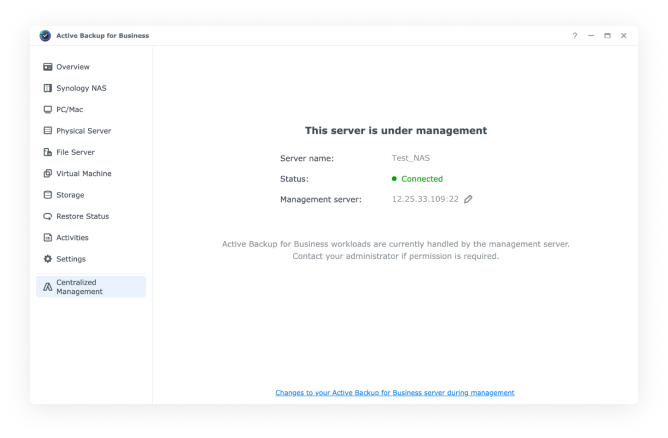
Synology shows Active Backup for Business servers joined into an ActiveProtect cluster.
How the integration works
Adding an existing ABB server into an ActiveProtect cluster is straightforward. You point ActiveProtect to the NAS by domain name, enter the ActiveProtect connect key, and import the server. You can repeat this for multiple ABB servers, so every branch office or department NAS can feed into the same central system without reconfiguring your existing backup jobs.
Once connected, ActiveProtect Manager gives you a single pane of glass for workload visibility, backup status, error logs, and cross-site or multi-device monitoring. You stop hopping between browser tabs and different IP addresses. You stop guessing whether the branch office backup actually ran last night, and you stop finding out about failures days after they happened.
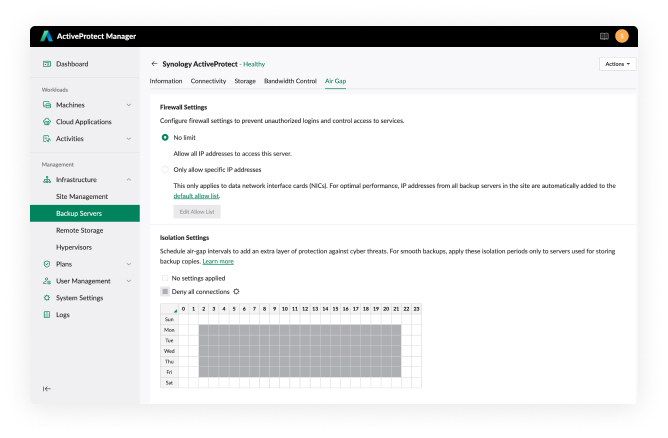
ActiveProtect Manager includes air-gapping controls for backup-copy windows.
Stronger protection without more daily complexity
ActiveProtect lets you build custom protection policies that schedule backup-copy safeguards based on version count or time. That means your primary ABB backups can stay fast and local for quick file restores, while ActiveProtect handles the safety copies with stricter rules and longer retention.
You can also run restore drills across multiple targets from one platform. If you have never tested a full system restore, that is a gap worth closing immediately. Knowing the backup completed is not the same as knowing the recovery works, and many businesses learn that lesson at the worst possible moment.
For ransomware resilience, ActiveProtect supports version-level immutable backups with retention lock. Once a backup version is written, it cannot be changed or deleted—not by ransomware, not by insider misuse, not by administrative accident. That is a hardening layer your standalone ABB servers do not provide on their own.
Built-in air-gapping goes further. You can limit network transmissions to approved windows and approved source servers, then automatically shut down network interfaces or power off the appliance after copy tasks complete. The backup target is not sitting on the network twenty-four hours a day waiting to be found and encrypted.
Why this matters for your 3-2-1-1-0 discipline
If you are serious about backup hygiene, you have probably heard of the 3-2-1-1-0 rule: three copies of data, on two different media, one offsite, one immutable or offline, and zero errors after recovery verification. Most SMBs handle the first three numbers reasonably well. They struggle with the last two. ActiveProtect directly addresses the immutable or offline requirement and gives you a practical way to run recovery proof tests without disrupting production systems or burning weekend hours.
The result is less administrative burden, stronger ransomware resilience, and actual confidence that your backups will hold up in a real disaster rather than just looking good on a status screen.
What to do next
If you are already invested in Synology ABB, you do not need to start over. You need to stop managing backups like separate islands and start treating recovery as a business process you can verify. Ask Blue Chip Technologies to review your current backup gaps, test your recovery process, and discuss managed Synology and ActiveProtect options that fit your business size and budget.
Source: Synology Blog — Unify Active Backup for Business with ActiveProtect to Achieve Enterprise-Grade Disaster Recovery