
If your business runs workloads on Microsoft Azure or AWS, you need a backup copy that lives outside those cloud environments. Full stop. Native cloud backup tools are convenient, but they keep your production data and your recovery data in the same place—which means a compromised account, a ransomware incident, or even a billing dispute could lock you out of everything at once. An on-premises backup gives you an independent recovery path you actually control.
At Blue Chip Technologies Ltd., we've helped organisations of all sizes think through this exact problem. Here's why local backup still matters—even when your infrastructure lives in the cloud—and how Synology's ActiveProtect appliance makes it practical and surprisingly affordable.
Why can't I just rely on Azure Backup or AWS Backup?
You can, and for many scenarios they work fine. But there are gaps:
- Single point of failure. If your cloud account is compromised, both your VMs and your backups could be affected simultaneously.
- Data sovereignty. Regulated industries (healthcare, finance, legal) often need to prove exactly where backup data is stored and who can access it. Cloud regions don't always satisfy local compliance requirements.
- Restore flexibility. Native backups typically restore only to the same cloud platform. What if you need to spin up a VM on-premises for disaster recovery testing, or migrate part of a workload elsewhere?
None of this means cloud-native backup is bad. It means it's incomplete for organisations that want genuine resilience.
What does on-premises backup actually give me?
Isolation. Your backup sits on hardware you own, on a network segment you control. A bad actor who breaches your Azure tenant doesn't automatically get your local backup repository.
Control over retention. You decide how long backups are kept—no monthly per-GB charges ticking away. For long-term archival, this changes the economics significantly.
Recovery options. Restore a cloud VM to an on-prem hypervisor, test a recovery in a sandbox, or migrate workloads between platforms. You're not locked in.
How does Synology ActiveProtect handle cloud-to-local backup?
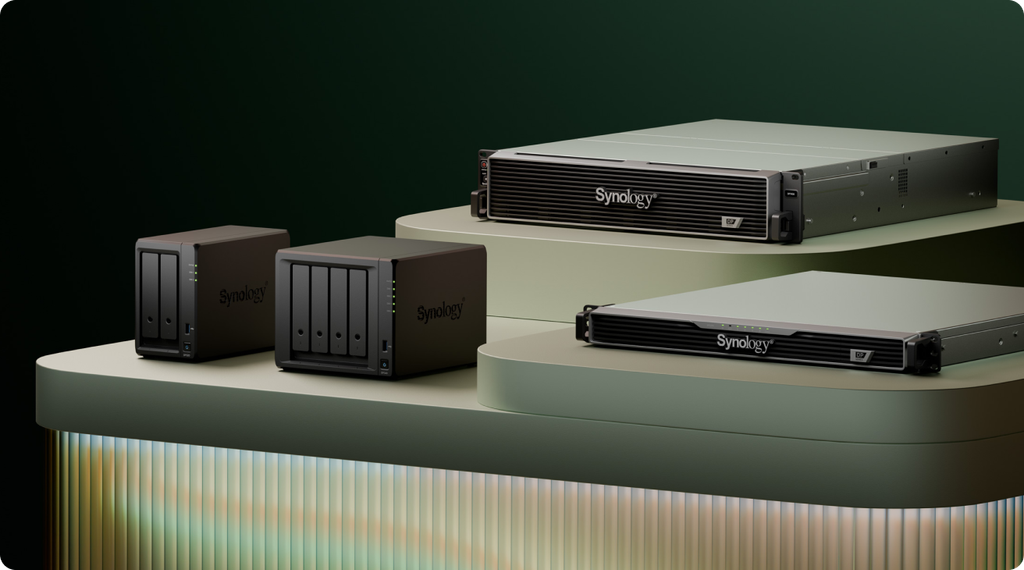
ActiveProtect is a purpose-built backup appliance that pulls data from Azure VMs and AWS EC2 instances without requiring agents inside those VMs. Here's the short version of how it works:
- When a backup job starts, ActiveProtect spins up a temporary worker instance inside your cloud environment.
- That worker reads the VM data, deduplicates it at the source using Synology's SURE (Unified Reduction Engine), and transfers only unique blocks to your on-premises appliance.
- Once the job finishes, the worker instance shuts down automatically—so you're not paying for idle compute.
The result: you move far less data out of the cloud than a traditional full-image backup would require, which keeps egress fees manageable.
Does this actually cost less than native cloud backup?
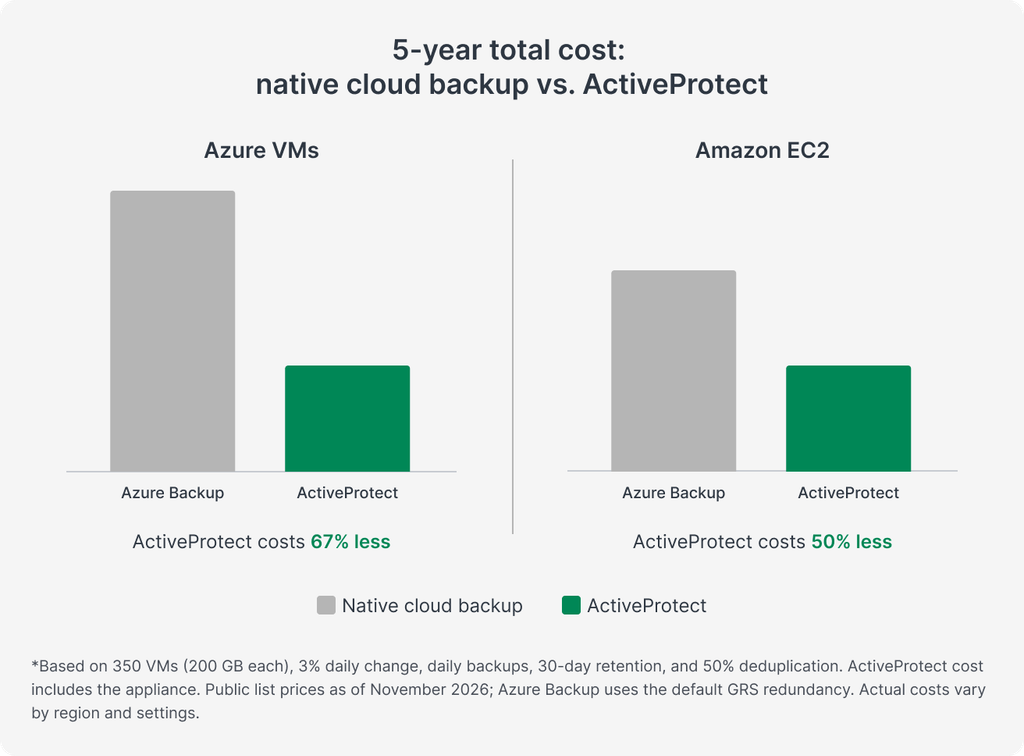
It can. Native backup services charge monthly for every gigabyte retained—and Azure Backup also charges per protected VM. Over a multi-year period, those fees add up.
ActiveProtect is a one-time appliance purchase. After that, your ongoing costs are:
- Egress for deduplicated data (often a fraction of the raw VM size)
- Short-lived worker instance runtime
Synology's own modelling suggests 50–67% savings over five years compared to native backup, appliance included. Your mileage will vary depending on workload size and retention policies, but the pricing model fundamentally favours organisations with significant data volumes or long retention requirements.
Can I reduce egress costs further?
Yes. ActiveProtect supports private routing through existing Site-to-Site VPN connections, AWS Direct Connect, or Azure ExpressRoute. If you've already invested in dedicated connectivity, you can route backup traffic over those links instead of the public internet—potentially lowering transfer costs depending on your provider agreement.
What about ransomware protection?
Two features worth noting:
- Immutable backups. ActiveProtect uses WORM (Write Once, Read Many) technology to prevent backups from being altered or deleted during their retention period.
- Air-gapping. You can isolate the backup appliance by disabling network connectivity or powering it off entirely outside scheduled backup windows.
Neither feature is magic, but together they make it much harder for an attacker who's already inside your network to destroy your recovery data.
What workloads does ActiveProtect support beyond Azure and AWS?
ActiveProtect isn't limited to public cloud. It also backs up on-premises virtual machines, physical servers, endpoints, and file servers. If you're looking for a single appliance that covers hybrid environments, it's worth exploring. For more detail on Synology's backup capabilities, see our data backup solutions page.
Frequently asked questions
Do I need to install agents on my Azure or AWS VMs?
No. ActiveProtect uses agentless backup for supported cloud workloads, which simplifies deployment and avoids compatibility issues inside guest operating systems.
Can I restore a cloud VM to on-premises hardware?
Yes. ActiveProtect supports restoring supported cloud workloads to on-premises virtualisation environments, which is useful for disaster recovery, migration, or testing scenarios.
How does source-side deduplication reduce costs?
The temporary worker instance identifies duplicate data blocks before anything leaves the cloud. Only unique blocks are transferred, which cuts both bandwidth usage and egress fees.
Is ActiveProtect suitable for small businesses?
It scales from small offices to enterprise deployments. The appliance-based model means you're not paying per-VM or per-GB monthly fees, which often makes it more accessible for smaller organisations with limited IT budgets.
Ready to talk backup strategy?
If you're running workloads in Azure or AWS and want a second recovery option you actually control, we'd be happy to walk you through how ActiveProtect fits your environment. Blue Chip Technologies Ltd. supplies, configures, and supports Synology solutions for clients worldwide—remote delivery anywhere, with on-site support available in Trinidad & Tobago.
Get in touch:
- Contact us online
- Call: 1 (868) 609-2288
- Email: [email protected]