
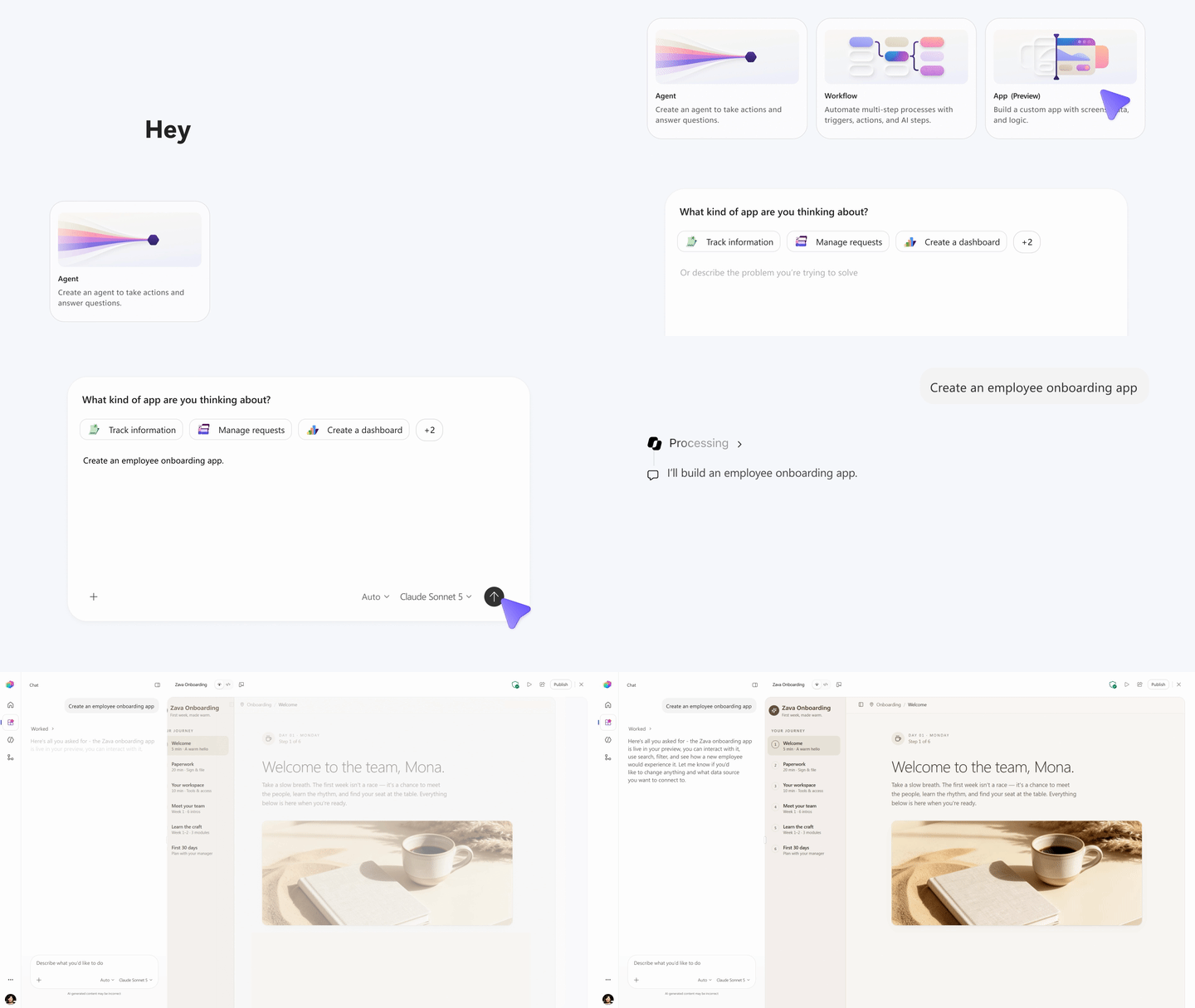
Microsoft 365 now lets you build custom business applications just by describing what you need in plain English. Through Copilot Cowork and Copilot Studio, you can create full-stack apps—complete with data connections, workflows, and user interfaces—without writing code or hiring developers. For businesses that have struggled to justify custom software projects, this changes the maths entirely.
What exactly is app building in Copilot Cowork and Copilot Studio?
Copilot Cowork is Microsoft's collaborative AI workspace, and Copilot Studio is the platform for building AI agents and automations. Together, they now offer conversational app development: you describe the business problem you're trying to solve, and the AI generates a working application grounded in your existing Microsoft 365 data.
Think of it this way. You tell the system, "I need an app to track equipment maintenance requests, assign them to technicians, and send reminders before warranties expire." Instead of that request sitting in a backlog for months, you get a functional prototype you can test and refine immediately.
Why does this matter for your organisation?
Most businesses have dozens of small operational problems that aren't quite big enough to justify a formal development project. The spreadsheet that three people update manually. The approval process that lives in email threads. The customer data that sits in one system but needs to connect to another.
These gaps cost real time and create real errors, but they've always fallen into an awkward middle ground—too complex for off-the-shelf tools, too minor for custom development budgets.
Conversational app building changes that equation. Your operations manager, who understands the problem better than anyone, can now prototype a solution directly.
How does it connect to your existing data?
The apps you build aren't isolated. They can pull from and write to:
- SharePoint lists and document libraries
- Microsoft Dataverse
- Excel files stored in OneDrive
- External data sources through connectors
This means your new maintenance tracking app can reference your existing equipment inventory in SharePoint, pull warranty dates from an Excel file your procurement team maintains, and log completed work orders to Dataverse for reporting.
Who should actually be building these apps?
This isn't about replacing your IT team. It's about letting the people closest to business problems create first drafts that IT can then review, secure, and scale.
A realistic workflow looks like this:
- A department head describes what they need in Copilot Cowork
- The AI generates a working app with data connections
- The user tests it with real scenarios and refines through further conversation
- IT reviews for security, data governance, and integration standards
- The app gets deployed to the appropriate users
Your IT team stays in control of governance while spending less time on requirements gathering and basic builds.
What's the catch?
A few things to keep in mind. These tools work best for internal business applications—think operational workflows, data capture, approvals, and reporting dashboards. They're not designed for customer-facing products or applications with complex custom logic.
You'll also need the appropriate Microsoft 365 and Copilot licensing. If you're not sure what your current agreement includes, that's worth checking before you start planning projects around this capability.
Frequently asked questions
Do I need coding experience to build apps this way?
No. The entire process happens through natural language conversation. You describe what you want, review what the AI creates, and refine through further discussion. Technical users can still access and modify the underlying components if needed.
Can apps built in Copilot Studio integrate with non-Microsoft systems?
Yes, through Power Platform connectors. There are hundreds of pre-built connectors for common business applications, and custom connectors can be created for systems without existing integrations.
How is this different from Power Apps?
Copilot Studio's app building uses the same underlying Power Platform technology, but the creation process is conversational rather than visual. The resulting apps can be edited in Power Apps if you need more control.
What happens to apps if we change our Microsoft licensing?
Apps built on Power Platform remain accessible based on your licensing tier. Before building business-critical applications, confirm your licensing covers ongoing use and the user count you're planning for.
If you're running Microsoft 365 and wondering how to get more value from your subscription, conversational app building is worth exploring. Blue Chip Technologies Ltd. helps organisations worldwide implement and optimise their Microsoft 365 environments—including newer capabilities like Copilot Studio. We provide remote support globally, with on-site assistance available in Trinidad and Tobago.
For more on our Microsoft solutions, visit our Microsoft 365 services page. Ready to discuss what's possible for your organisation? Get in touch:
- Phone: 1 (868) 609-2288
- WhatsApp: Chat with us
- Email: [email protected]
- Contact form: bluechiptt.com/contact