Google's Gemini Notebook now includes an audio recorder, real-time voice conversations, interactive study tools, and short video overviews—all designed to help users capture, organise, and revise information more effectively. If your organisation uses Google Workspace, these features are rolling out now and could genuinely change how your team handles training, research, or any knowledge-intensive work.
What's new in Gemini Notebook?
These updates aren't just for students (despite the "back-to-school" label). Anyone who needs to absorb complex material—compliance officers, technical teams, project managers preparing for certifications—will find something useful here.
Can I record audio directly into my notes?
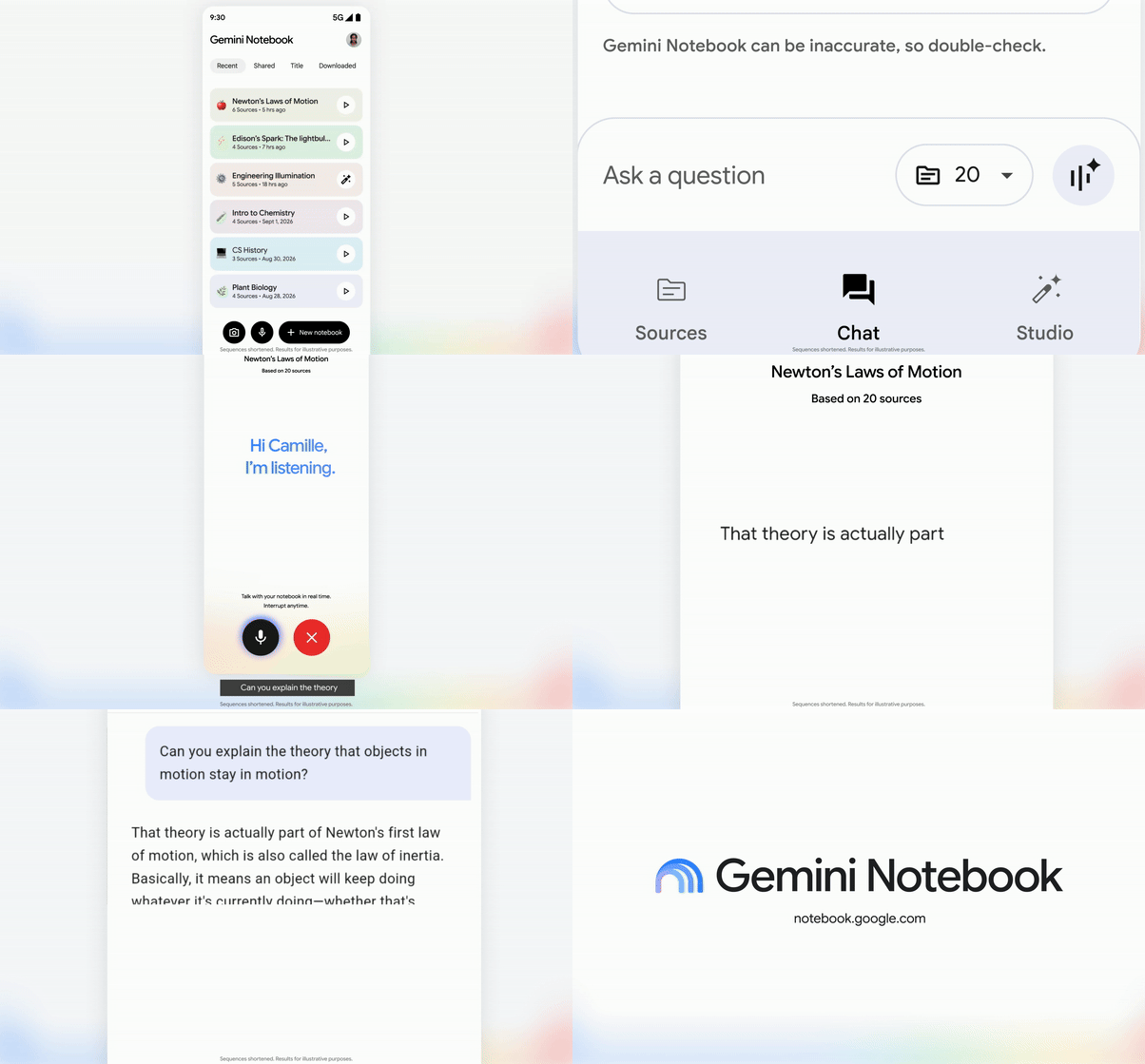
Yes. The mobile app (Android and iOS) now has a built-in audio recorder. You can capture a lecture, a client briefing, or your own voice memos, and the recording sits right alongside your other sources. That means easier citation and less time hunting for "where did I hear that?"
How does real-time voice conversation work?
Users 18 and older can now talk to their notebook—literally. Ask questions out loud, get step-by-step guidance, and interrupt whenever you need to. It works in nearly 100 languages, and every response is grounded in your actual sources, so you're not getting generic answers from thin air.
What are interactive learning overviews?
Under the Reports section, Gemini Notebook can now generate summaries that pull together quizzes, flashcards, and mind maps. It's a practical way to stay focused during a study session or quickly refresh your memory before a meeting.
How have the exam prep tools improved?
- New quiz formats: Short answer, multiple choice, and fill-in-the-blank options are now available.
- Performance chat: After completing a quiz or flashcard set, you can chat with your notebook about your results to identify weak spots.
- Customisation: Add or edit questions in quizzes and flashcards to match your specific learning goals.
What are Short Video Overviews?
Gemini Notebook can now create bite-sized videos (around 60 seconds) that explain complex topics using narrative and animation. These are available in more than 80 languages, and you can share them with colleagues or classmates. Useful for onboarding materials or breaking down technical concepts for non-specialists.

How do admins enable these features?
If you manage Google Workspace for your organisation, these tools are available to users in any group or organisational unit where Gemini Notebook is set to "On." There's no end-user configuration required—once it's enabled, people can start using the features immediately.
For more on managing Google Workspace tools across your organisation, see our Google Workspace solutions page.
Who gets access?
These features are available to:
- All Google Workspace customers
- Workspace Individual subscribers
- Users with personal Google accounts
Rollout began on 15 September 2026 and may take longer than 15 days to appear for all users.
Frequently asked questions
Do I need a separate licence for Gemini Notebook?
No. Gemini Notebook is included with Google Workspace subscriptions, Workspace Individual, and personal Google accounts. Admins just need to ensure it's turned on for the relevant users.
Can I use the audio recorder on desktop?
Currently, the audio recorder is only available in the Gemini Notebook mobile app (Android and iOS).
Is the real-time conversation feature available to all users?
It's available to users 18 years or older. Admins can control access through organisational unit settings.
What languages are supported for Short Video Overviews?
More than 80 languages are supported for video creation.
Ready to get more from Google Workspace?
If you'd like help enabling Gemini Notebook for your team—or want to explore what else Google Workspace can do for your organisation—Blue Chip Technologies Ltd. is here to help. We support clients worldwide with remote setup and ongoing assistance.
Get in touch:
- Contact us online
- Call: 1 (868) 609-2288
- Email: [email protected]