If you've ever been watching a Google Meet live stream on your Android phone and suddenly needed to speak up—ask a question, give input, or join the actual discussion—you can now switch from viewer to active participant without leaving the app. No fumbling for a separate meeting link, no closing and reopening apps. Just tap and you're in.
This update brings Android in line with what iOS and web users already have, and it's a small change that makes a real difference when you're running company-wide broadcasts, training sessions, or client webinars.
How does the viewer-to-contributor switch actually work?
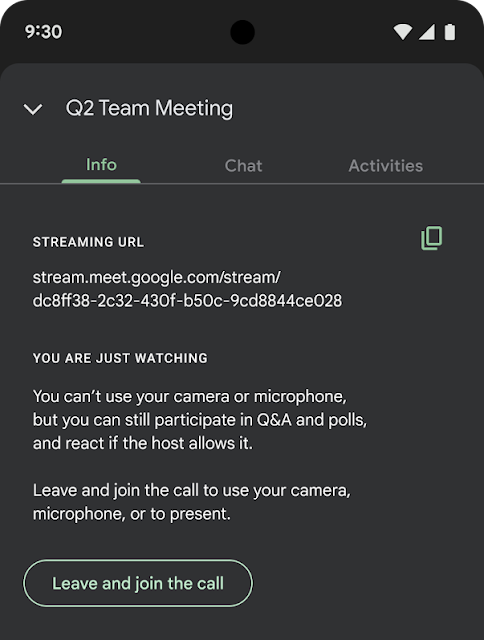
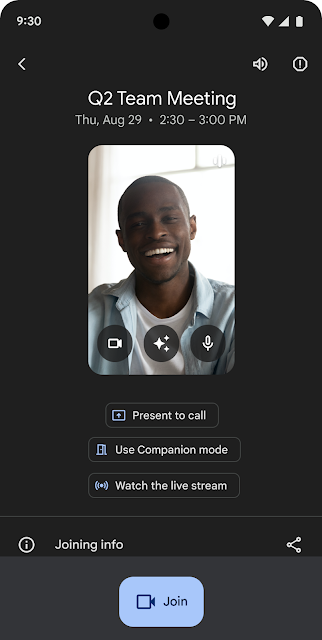
When you're watching a live stream on Android, you'll see options to join the main meeting room directly. These appear via:
- The meeting title at the top of the screen
- The live streaming badge
- The info button in the overflow menu
Tap any of these, and you transition straight into the meeting with your camera and microphone—no need to hunt through your calendar or email for a different join link.
Who can use this feature?
Not everyone watching a stream will see these options. You need to be invited to both the live stream and the underlying meeting. Your existing meeting permissions and domain policies still apply—so organisers keep full control over who can actually join with audio and video.
This is available to:
- All Google Workspace customers
- Workspace Individual subscribers
- Users with personal Google accounts
There's nothing for admins to configure. It just works based on the permissions already in place.
When is this useful in practice?
Think about a quarterly all-hands meeting. Most staff watch the stream, but department heads might need to jump in for their segment. Or a training webinar where a regional manager wants to answer questions live partway through.
Previously, that person would need to leave the stream, find the meeting invite, and join separately. It's clunky, and if they're on mobile between appointments or travelling, it's genuinely frustrating. Now they just tap once and they're contributing.
If your organisation uses Google Workspace for collaboration and communication, this kind of incremental improvement adds up. Less friction means people actually participate instead of giving up.
Frequently asked questions
Do I need to do anything to enable this for my team?
No. There are no admin controls to toggle. The feature rolls out automatically based on existing meeting permissions.
What if I only have access to the live stream, not the meeting itself?
You won't see the switch option. Only viewers invited to both the stream and the main meeting can transition.
Is this available on iPhone and desktop too?
Yes. iOS and web users already have this capability. Android is now caught up.
When does this roll out?
The extended rollout begins 19 October 2026 for both Rapid Release and Scheduled Release domains.
Need help getting more from Google Workspace?
Blue Chip Technologies Ltd. helps businesses worldwide get Google Workspace set up properly and working the way their teams actually need it to. Whether you're migrating from another platform or want to make better use of what you've already got, we're happy to talk it through.
Get in touch:
- Contact us online
- Call: 1 (868) 609-2288
- Email: [email protected]